January 23, 2001
Palm releases Desktop 4
Palm Inc. recently released Palm Desktop 4.0, though they neglected to tell
anyone. It won't work with other Palm OS devices, only Palm's own devices, and perhaps the TRGpro and Symbol machines.
I'm not sure yet, but it appears that they're excluding Sony and Handspring, since they use different drivers
for their USB interfaces. I'll test it to find out. Rather than tell you the features, go to
Palm's
website for more info, or check back here for a review in the future. I'm going to check it out tonight or tomorrow; if you
check it out yourself, let me know what you think by clicking on my name and sending me an email: -Shawn Barnett. Also, don't forget to read about the VisorPhone below...
January 22, 2001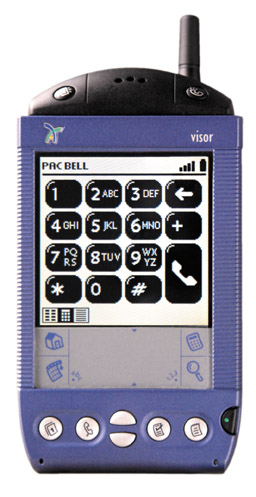
VisorPhone Review
Handspring's VisorPhone went on sale late December of 2000, and
what a cool device it is. Retailing for US$299, it plugs into your Visor's Springboard slot and turns
the new combo into a GSM cell phone and wireless handheld computer that can even browse the web. We're
not talking limited WAP or Web Clipping, but actual web browsing.
Check out our review by clicking here.
December 12, 2000
PalmSource 2000 Report
Palm's big developer convention is under way in Santa
Clara, CA this week, and I'm on location to get the scoop on all of what's going on in the world
of Palm and its licensees. While most of what I'm gathering will appear in certain issues to come,
I want to let you know about a few things that I think are interesting in my
PalmSource Report. As time allows,
I'll post info there this week. I'll probably put most photos up after I get back to the office, since
making them web ready long after convention hours is time-consuming.
November 21, 2000
Palm OS 3.5 available, with one minor hitch for Handspring Visor users
Along with their MyPalm portal and Mobile Internet Kit announcements at Comdex,
Palm also announced availability of the Palm OS 3.5 upgrade for the Palm III, Palm IIIx, Palm V, Palm Vx, and Palm VII. The
upgrade for the Palm Vx is free, while the upgrade for the other units will be available for US$19.95 on CD-ROM,
or US$14.95 via download. For owners of only one Palm or many Palms of the Palm brand, upgrade is a simple process,
automated by a Java application. Those who sync a Handspring device along with a Palm device (as do I) will have
a problem. I'm afraid I ran into quite a few problems with this download, since I tried to do it last Sunday, only a couple of days after
the announcement, but most of them have been ironed out. The final remaining obstacle was new to the folks at Palm tech
support--who unfortunately didn't even know the upgrade had been made available--but involved the above-mentioned
conflict between the Handspring and Palm versions of the Palm Desktop. Note that the upgrades can be applied only to the
device specified before download, and will not work with non-Palm products; no upgrade is currently available for Handspring devices.
For those upgrading a system that uses both a Palm and a Handspring device that syncs through USB, here's the solution as I found it:
1. Download the Palm Upgrade software, and let it install. Follow all instructions. When you come to the point where it fails, it will say,
"The Palm OS Software upgrade utility encountered an error reading the handheld's product code. As a result, the
software upgrade cannot continue. Timeout error." Just press OK, and you'll be dumped back onto your desktop. (If this doesn't happen,
either they've fixed the application and you should let me know, or else you didn't have the Handspring version of the desktop running.)
2. Close all programs, like the browser you used to download the software.
3. Locate and run the Palm Desktop. There should be an icon on your Windows Desktop. Before it timed out, the install
program put Palm Desktop 3.1 on your system,
but it didn't fully update some aspects of the HotSync application. If you run the new Palm Desktop application, however,
it finishes its update and you'll be able to complete your OS upgrade.
4. Find the install file. Don't try to go back to the website link that Palm emails you, because that link
will no longer work. Go to the Windows Explorer and look
for your Palm directory. It will either be in the root directory if you've been a Palm customer
for awhile, or it'll be in the Program Files directory. Inside the Palm directory, you'll find another directory
where the upgrade software is stored; in my case the directory is called PalmOS3.5. Go into that
directory and double click the install application (for the Palm VII it is called "PalmOS350_ENG_PalmVII.exe").
5. Allow the application to re-install the Palm Desktop and then follow its instructions for HotSyncing your
device and installing the upgrade. The screen will look funny as it upgrades, but this is normal. After the
upgrade is complete, reboot your Palm device and your computer. Then, if you want to continue to HotSync both your
Palm and Handspring device, you'll need to reinstall your Handspring-specific Palm Desktop. This is true whether
you sync to the Palm Desktop or some other PIM, like Outlook, because the main HotSync application must be upgraded to
support HotSync with the Visor through a USB port. Because the application has been upgraded recently, you might want to
download the latest version from the Handspring website.
Note that the download may be updated (hopefully) before you read this, rendering these instructions unnecessary... Keep
me posted. -Shawn Barnett
November 1, 2000
Visors on sale at Target
Continuing their push to sell to new audiences, Handspring has
arranged to offer their Visor handhelds in Target stores. The move will effectively add 900 storefronts
to the list of places people can walk in and buy a Handspring product. The rollout will be done in phases,
starting in Arizona this month, then rolling out nationally before the end of the year.
Palm CEO talks about new products
Carl Yankowski yesterday appeared on the On24 Financial Network to talk
about Palm's future products and the state of Palm in general. In the brief interview, he revealed a lot
about an upcoming product, the new Palm Vx, which he said would include the SD expansion slot, and an option
of both color or monochrome screens. He then mentioned in rapid succession the following, which it was unclear
whether would be included in the Palm Vx or just available: AOL-style instant messaging, server sync, and
email notification, plus something he calls "RIM-type functionality." As expected, the new OS, which will presumably run on a StrongARM processor, should also debut in the
second half of the year. Yankowski also mentioned the cool uses the US Navy has found for Palm OS computers onboard
aircraft carriers, including on the USS Constellation. There, the landing signal officers score each landing on a Palm,
then sync the device so the landing report is available to the pilot immediately after they get out of the aircraft.
To see the video yourself, click here.
October 16, 2000
New Visors, one color, both very fast
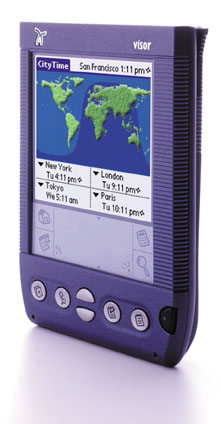
Handspring today announces and offers for sale their
hot new Palm OS computers: the new Visor Platinum, which they say is 50% faster, and the
Visor Prism, which also sports a 16 bit color screen (65,000 colors) and an internal
rechargeable battery. The new units are the first to use the new Dragonball VZ processor
running at 33MHz, and will go on sale today at Handspring's website.
Check out our review.
September 29, 2000
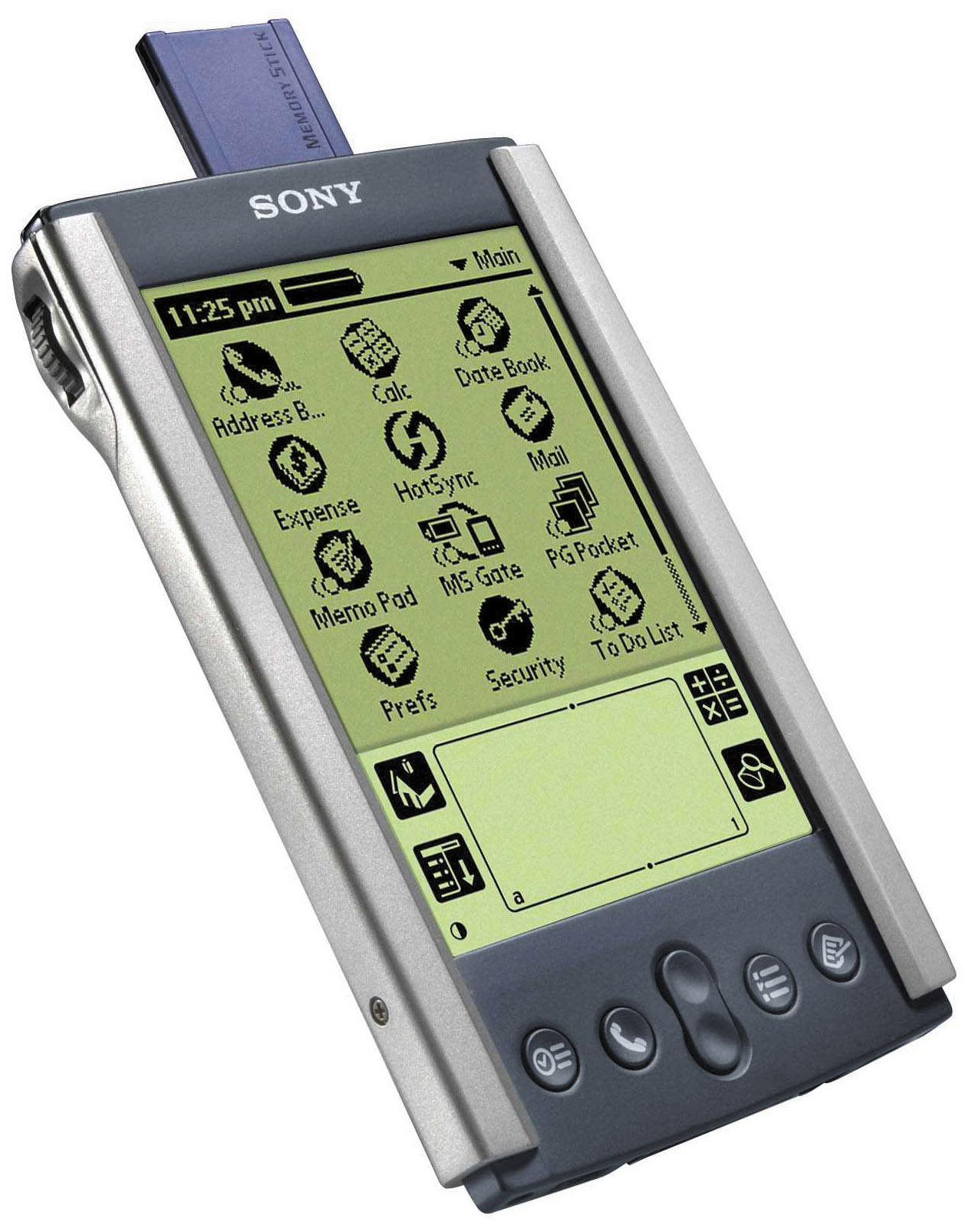
Sony CLIE Review
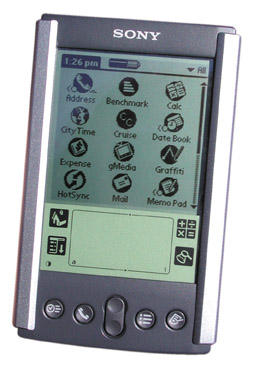
Finally I have a little time between issues to put up web stuff, including
the review of the new Sony CLIE. It's an impressive little computer. It's smaller than any
Palm before it, has a Memory Stick slot for removeable storage, and a unique Jog Dial for quick, one-handed access
to basic features. It retails
for US$399, and I've already seen them in stock in a local Best Buy store.
-Shawn Barnett
September 25, 2000
Phone module signals new generation
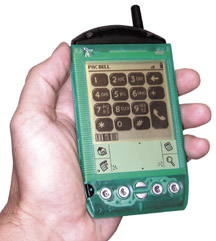
Today Handspring announced its new Visor Phone, a module that
integrates a GSM phone into your Visor. Operation is simple, you plug it in
and the software is loaded. You can use the included headset or
simply hold the Visor up to your ear like a regular phone. Yes, the
Visor's built-in microphone finally has a use. The first model is
a GSM phone, but that allows for some pretty cool features, including 9.6Kbps modem functionality and
compatibilty with any modem software. You can use the Visor's other programs while making calls,
even holding conference calls. Speed dialing is done easily with the push-button interface, and calls
are logged, including missed calls. There's even a short message service for chatting with your
buddies no matter where you are.
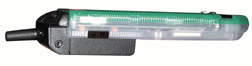
Price will be US$299 and it will only available on Handspring's website. Orders can be taken early, but the phones
won't be available until late November. There is a possibility of future phones that will be compatible
with CDMA and other standards; whether those will come from Handspring or other vendors is unclear. Service
will be through Bell South DCS, Pacific Bell Wireless, Powertel, and VoiceStream. Jeff Hawkins mentioned at PC Expo that he thought the future of
handheld devices was voice, and he clearly meant what he said.
A similar phone was announced last Friday by Palm, Inc., probably in anticipation of Handspring's announcement
today. This phone will also be available only on GSM networks, with a list of simliar features, and at the same price of
US$299. It is designed for the Palm V. Release of this unit
is expected in early 2001, and it will be made by RealVision. Arrival of the Handspring Visor Phone looks to
be considerably more imminent, since I've seen a working model of the Visor Phone, and only mockup drawings
of the as yet unnamed phone for the Palm V. Either way, it looks like there might be an integrated phone
in your future. -Shawn Barnett
August 31, 2000
Sony CLIE' officially announced
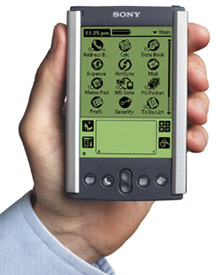
The monochrome version of Sony's new Palm OS-based handheld for the US
Market will be called the CLIE'. Pronounced "klee-AY," CLIE' stands for Communication, Link, Information, and Entertainment.
The new device is designed to be more of a multimedia device than other Palm OS computers have been,
as evidenced by its Memory Stick slot and bundled multimedia software. An 8MB Memory Stick is included with the
CLIE' handheld. Another significant feature will be the JogDial, situated in the upper left hand corner. Turning
this dial brings up a pull down menu with the applications list. With this Jog Dial Navigator, many simple selection
tasks can be performed without even removing the pen, according to Sony.
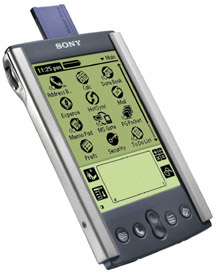
The CLIE' is also a little smaller than other Palm OS devices, including the Palm V. While maybe a smidge taller than the Palm
V, the CLIE' is 2.79 inches wide, while the Palm V is 3.1 inches wide. Other features are 8MB of RAM, 2MB of Flash,
USB interface, Lithium Ion rechargable battery (which charges through the cradle and lasts up to 15 days on a single charge),
PictureGear Pocket Software for viewing and sharing images (and even including images in an Address Book entry), and
gMedia video player software. AvantGo is bundled with the CLIE', as well as TrueSync software for synchronization with
MS Outlook and Lotus Organizer. The product is expected in stores sometime in September, and pre-orders can be
placed on the following website: www.sony.com/clie/. No word yet on when the
color version will be available. Watch this site for a comprehensive review when the unit becomes available. -Shawn Barnett
August 7, 2000
New Palms Announced
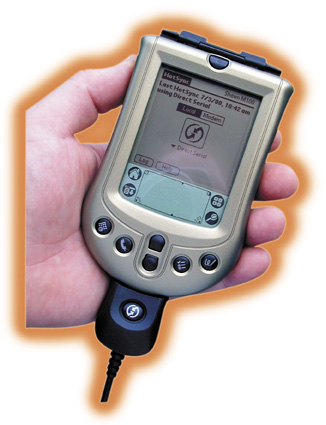
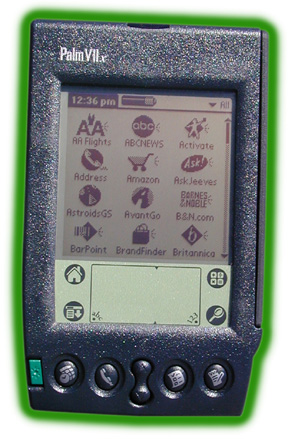
Palm today announces two hot new products in their lineup:
the Palm m100 (US$149) and the Palm VIIx (US$449), as
well as some special edition Palm Vxs and some accessories that will be made available soon. The most
newsworthy item was scooped by a few in the press who just couldn't wait, but we bring you more
than a surreptitiously-obtained snapshot and a few dubious facts: we have a comprehensive review of the m100 and
the Palm VIIx online now. -Shawn Barnett
Also announced today are the Palm Vx models (US$399), now available with two new anodize colors:
Millenium Blue and Champagne, described as a gold color.
 The Palm Ethernet Cradle will finally ship as well. It offers a 10 MBps communication with Palm's new
HotSync Server software, and allows easy HotSync to the network with no host desktop computer necessary.
The PalmModem Connectivity Kit was also announced today, offering enhanced dialup for existing Palm III
type computers, including the Palm IIIxe, Palm IIIc, Palm VII-series and the TRGpro. The kit includes a 33.6
BPS landline modem and three connectivity applications: AOL Mail, MultiMail Pro, and Yahoo! Messenger. The
new modem kit will be available at retailers in late August. -Shawn Barnett
June 1, 2000
Read the Jeff Hawkins Cover Story
If you don't know it already, Jeff Hawkins is the genius behind the continually
expanding universe of Palm computers. Currently Chairman and Chief Product Officer at Handspring, Hawkins is leading the
way to the next generation of handheld computers, and has some interesting ideas about how brains work, and how they interface with a computer.
Read how he got to where he is and where he thinks the handheld computer
market is going in our exclusive cover story: Jeff Hawkins, the man who almost single-handedly revived the handheld computer industry.
To see the entire Palm contents of the April issue, scroll down to "Palm Content by issue." -Shawn Barnett
|
Palm VII users: Download the new

Pen News PQA
and get wireless access to the latest news from the world of handheld computing.
Updated 4/28/99
PCM AvantGo Channel
Pen Computing Magazine has an AvantGo Channel for Palms and Windows CE machines.
If you'd like to
receive our Daily News, subscribe by clicking on
the "Subscribe to AvantGo Channel" button below. The channel will automatically
download to your Palm or Windows CE machine every time you synchronize.
 If you do not have AvantGo installed on your machine, please click on the
button below to sign up and download.
If you do not have AvantGo installed on your machine, please click on the
button below to sign up and download.
|