 |
|
|||||||||||||||||||||||||||||||
Tablet PCs: HP Compaq Tablet PC TC1000Slate with detachable keyboard and dock offers unmatched flexibility
So what is the TC1000? It is a very compact slate computer with a keyboard that attaches to the slate to provide notebook functionality without actually making the TC1000 a notebook. By itself, the TC1000 has a footprint of just 10.8 x 8.5 inches, almost as small as the diminutive Acer TravelMate. However, being a slate, the TC1000 is thinner than the Acer by three tenths of an inch (0.8 vs. 1.1 inches) and lighter, too (3.0 vs. 3.2 pounds). In tablet mode, the TC1000 is thus an ultra-compact, sleek and elegant slate with that's big enough to let you hold it in your hands without obscuring the 10.4-inch display, but small enough to look tight and neat and efficient.
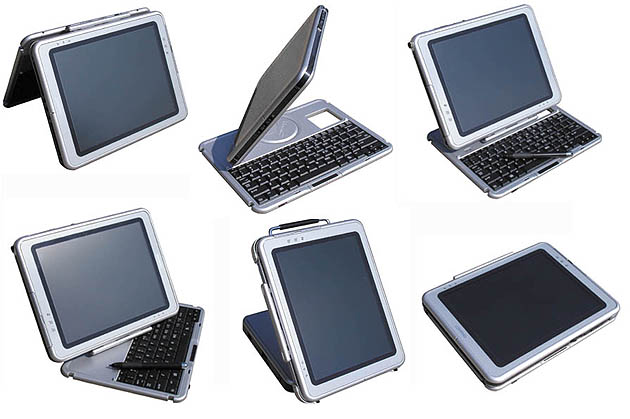
The big difference between the Compaq and any other product in this lineup is the keyboard and the way it is implemented. Having the exact same footprint as the slate part, the keyboard snaps onto the bottom edge of the TC1000. It contains a swivel mechanism that lets you either lay the keyboard flat against the backside of the slate, or have the slate part be on top so that the combo can be used just like a notebook. The swivel is engineered so that the bottom hinge is not at the end of the keyboard where it would be in a standard notebook, but just behind the keys, about 40% away from the back edge of the keyboard. This means that the combo sits securely and is never in danger of tipping over, despite the light weight of the keyboard part. Very, very clever. The arrangement also means you can use the keyboard as a stand when you're running presentations on the display. The one thing I had to get used to is that I instinctively tried to twist the keyboard over the display side of the slate as if it were a standard notebook, when in fact it folds down over the backside. I would have preferred that transformation actually, but it would have precluded the clever mid-mounting of the hinge, so it was a design decision I can live with. I also liked the fact that the keyboard securely fastens to the backside of the TC1000 when you use it as a slate. No rattling there.
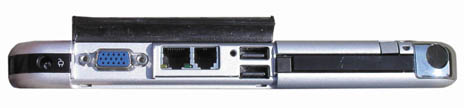
The second difference is the FinePoint digitizer instead of the Wacom system used by the others. FinePoint supporters claim significantly less noise and more accurate cursor control, especially along the edge of the display. On the other hand, the FinePoint pen requires its own AAAA battery which lasts over a year even when the computer is used a full shift every day. The FinePoint pen is thicker than the Wacom pens, but I definitely liked the very steady "feel" of the pen/digitizer combo. Another neat thing is a sheet of tempered glass that covers both the digitizer and the bezel. On the connectivity and onboard peripheral front, HP managed to pack an amazing amount of functionality into a slate as small and light as this one. A flap on the top (or left if used in landscape mode) covers two USB ports, LAN and modem ports, and a standard VGA connector for an external monitor. Next to that are, stacked on top of one another, a Type II PC Card slot and a Type II/III CF card slot. Beside that is the bay for the pen. The CF slot dummy insert is actually part of the edge design, so make sure you don't misplace it when using a CF card. Along the right top there is the power switch with a built-in power/standby light, an "Email launch" button, an Escape and a Tab button, a "Q menu" button that brings up a very handy on-screen master configuration utility, and a Pocket PC-style jog dial. Hidden between the Tab and Escape keys is the Ctl/Alt/Del "security button" that can only be triggered with a paper clip or something similar. Along the bottom there is a microphone jack and both a stereo-out and a headphone jack. Absent are IR and Firewire. I should mention that HP also implemented three silk-screened touch areas that launch the Input Panel, Journal, and rotate the display.
Overall, it's hard not to be impressed with this machine. For once, a big company went all out with a new design and different technologies instead of simply playing it safe. Despite the Acer and the Toshiba's versatile convertible hinge designs, the TC1000 is easily the most innovative design of the bunch and it offers unmatched flexibility. In addition, it looks great and it works well, and it comes from one of the biggest computer companies in the world. The various hinges and connections don't always twist and turn the way I would have expected (and wanted), but the TC1000 is a very compelling design. Hewlett Packard deserves a big pat on its corporate back. -
HP/Compaq: www.hp.com Hewlett Packard: www.hp.com
-
|
||||||||||||||||||||||||||||||||
|
[Homepage] All contents ©1995-2002 Pen Computing Magazine, Inc. All rights reserved. |

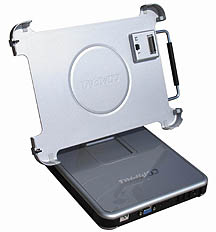 For those who intend to use the TC1000 as a desktop replacement at least part of the time, Compaq offers a heavy docking station that adds your choice of optical drive plus an additional three USB ports, and its own LAN, VGA and audio ports. The dock can accommodate the TC1000 both with and without its keyboard attached to it. If the dock is too much and all you need is an optional external MultiBay that can accommodate a variety of drives.