<?xml version="1.0" encoding="utf-8"?>
<feed version="0.3" xmlns="http://purl.org/atom/ns#" xmlns:dc="http://purl.org/dc/elements/1.1/" xml:lang="en">
<title>Conrad&apos;s iPhone and iPad blog</title>
<link rel="alternate" type="text/html" href="http://www.pencomputing.com/mt_iphone/" />
<modified>2012-10-23T21:54:52Z</modified>
<tagline></tagline>
<id>tag:www.pencomputing.com,2012:/mt_iphone/11</id>
<generator url="http://www.movabletype.org/" version="3.17">Movable Type</generator>
<copyright>Copyright (c) 2012, conradb212</copyright>
<entry>
<title>Apple Event October 23, 2012: New 13&quot; MacBook Pro, Mac mini, iMacs and a 7.9-inch iPad mini</title>
<link rel="alternate" type="text/html" href="http://pencomputing.com/mt_iphone/archives/2012/10/apple_event_oct.html" />
<modified>2012-10-23T21:54:52Z</modified>
<issued>2012-10-23T20:13:00Z</issued>
<id>tag:www.pencomputing.com,2012:/mt_iphone/11.794</id>
<created>2012-10-23T20:13:00Z</created>
<summary type="text/plain">Apple announcements used to be among the most highly anticipated media events on the planet when everyone wanted to see Steve Jobs do his magic on stage. It&apos;s not the same anymore without Steve, it, but everyone still breathlessly awaits...</summary>
<author>
<name>conradb212</name>

<email>cb@pencomputing.com</email>
</author>

<content type="text/html" mode="escaped" xml:lang="en" xml:base="http://www.pencomputing.com/mt_iphone/">
<![CDATA[<p>Apple announcements used to be among the most highly anticipated media events on the planet when everyone wanted to see Steve Jobs do his magic on stage. It's not the same anymore without Steve, it, but everyone still breathlessly awaits the news from Cupertino, especially when it's a long rumored smaller iPad.</p>]]>
<![CDATA[<p>To be honest, it's a little painful to watch Tim Cook and Phil Schiller try to be like Steve. They are great guys, both, and supremely competent in almost everything they do, but on stage it's more like watching the characters from the movie "Bill and Ted's Excellent Adventure." Don't try so hard, guys. Just be yourself.</p>

<p>Anyway, on October 23, 2012, Apple actually announced more than I expected. </p>

<p>First, it was a 13-inch MacBook Pro, impossibly thin at just 0.75 inches, weighing only about 3.5 pounds, and powered by the latest Intel Ivy Bridge processors. Screen resolution is a massive 2560 x 1600, four times what the old 13-inch MacBook was/is. There are to USB 3.0 ports, two Thunderbolt ports, an SD Card slot, a 7-hour battery, 8GB of RAM, and solid state drives up to 768GB, and it all starts at US$1,699.</p>

<p>Then there's a heavily updated Mac Mini. The little Mac Mini box has been around the block several times, but it's still a nice way to have a componentized Mac, and a lot of people use them as servers. Anyway, they, too, get Ivy Bridge chips, up to 16GB of RAM, up to a terabyte of disk, and they still start at US$599.</p>

<p>There's a new generation of desktop iMacs that look the same from the front but they are a whole lot thinner. Resolution stays the same at 2560 x 1440 for the 27-inch model and 1920 x 1080 for the smaller 21.5-inch model. There's now antireflective coating that, ahem, should get us back to the way Mac screens used to be. There are new processors, of course, USB 3.0, Thunderbolt, up to 32GB of RAM, up to 3TB of disk (or up to 768GB of SSD), and there's a new "Fusion" hybrid drive that combines 128GB of Flash with a one or three Terabyte hard drive. The SD card slot has moved to the back (where it'll be hard to access) and, alas, no more optical drive. Pricing starts at US$1,299 for the 21.5 and US$1,799 for the 27-incher. I am not sure why the iMac had to be so much thinner. I mean, it's not like you have to carry it around, and you always look at it from the front.  </p>

<p>Then it was time for iPad news. While everyone had expected a smaller Mac mini, few had expected a 4th generation regular iPad, and yet Apple introduced one just half a year after the 3rd gen. Thanks to a new A7X chip, CPU and graphics are said to be twice as fast, as is WiFi, and there's also a new ISP. The FaceTime camera is up to 720p. Battery life (10 hours) and pricing remain the same, but the 4th gen iPad has the new "Lightning" connector that was introduced with the iPhone 5. The new connector probably was the primary reason for the update. There was much grumbling amongst live commentators about how cheated 3rd gen iPad customers will feel about a new iPad so soon. Honestly, it doesn't bother me. My 3rd gen is plenty fast.</p>

<p>The much anticipated iPad mini looks, as was to be expected, like a slightly shrunken iPad, albeit with a noticeably smaller bezel. I say "slightly" shrunken because its display measures 7.9 inches diagonally, and not the 7.0 inches expected. It's using the same 4:3 aspect ratio as the standard iPad, and so there's considerably more screen real estate than on a 7-inch tablet. Why's that? Because even with the same diagonal size, a 4:3 display offers considerably more screen area than a wide format 16:9 screen. Add the iPad mini's larger diagonal size, and it should feel like something between a 7-inch wide-format tablet and a standard iPad.</p>

<p>The iPad mini weighs just .68 pounds, less than half of the full-size one, and it's also a good bit thinner.  It's powered by a dual-core A5 chip, has FaceTime HD, a 5mp iSight camera, LTE, 802.11a/b/g/n WiFi and a 10 hour battery. Screen resolution is 1024 x 768, which means it's considerably sharper than the original iPad and iPad 2, and few complained about those tablets' resolution.</p>

<p>What about price? That'd be US$329 for the 16GB version, US$429 for 32GB, and US$429 for 64GB. WWAN radio ads the usual US$130 to each version.</p>

<p>There immediately was much yammering from the instant tech commentators. Specs not as good as tablets from Google and Amazon and others. Too expensive. Not enough resolution. And so on. The way I see it, for those who want a handier, lighter package than the full-size iPad, the new iPad mini offers all the speed and power a tablet like this needs, and it'll offer a much more satisfying viewing experience than a cramped wide-format 7-inch tablet. As for price, it's entirely appropriate.</p>]]>
</content>
</entry>
<entry>
<title>iPhone 3GS battery replacement: not for the timid</title>
<link rel="alternate" type="text/html" href="http://pencomputing.com/mt_iphone/archives/2012/06/3gs_battery_rep.html" />
<modified>2012-06-28T17:20:57Z</modified>
<issued>2012-06-16T15:35:44Z</issued>
<id>tag:www.pencomputing.com,2012:/mt_iphone/11.749</id>
<created>2012-06-16T15:35:44Z</created>
<summary type="text/plain">With millions of people replacing their older iPhones with newer ones, what happens to the old ones? Well, some are sold to one of the several used electronics merchandisers, others directly on eBay, or they may be passed on to...</summary>
<author>
<name>conradb212</name>

<email>cb@pencomputing.com</email>
</author>

<content type="text/html" mode="escaped" xml:lang="en" xml:base="http://www.pencomputing.com/mt_iphone/">
<![CDATA[<p>With millions of people replacing their older iPhones with newer ones, what happens to the old ones? Well, some are sold to one of the several used electronics merchandisers, others directly on eBay, or they may be passed on to friends or family less obsessed with having the latest and greatest. Many iPhone users simply keep their old one, either letting it gather dusk in a drawer somewhere, or perhaps actually using it via WiFi as a fancy iPod Touch. But there is one problem with older iPhones: the battery.<br />
</p>]]>
<![CDATA[<p>Like the rechargeable batteries in laptops and other electronic devices, the battery in every iPhone gradually loses its ability to hold a charge. Apple says that "a properly maintained iPhone battery is designed to retain up to 80% of its original capacity at 400 full charge and discharge cycles." A full charge cycle means charging the battery, then letting it completely run dry. Most phone users, of course, put their phone on charge long before the battery is dead, so how many charge cycles a battery has on it is difficult to tell. And do note that lithium-based batteries like to be used, or they'll lose their capacity to recharge sooner.</p>

<p>What all this means is that the battery in most used iPhones will be close to the end of its useful life, resulting in ever less battery life per charge (<a href="http://www.apple.com/batteries/iphone.html" target="_blank">see Apple's battery page</a>]. Unfortunately, the iPhone battery isn't user-replaceable and there isn't a conventional battery compartment. So when the battery needs to be replaced, the phone has to be sent to Apple. The charge as of mid-2012 is US$79 plus US$6.95 shipping (<a href="http://www.apple.com/batteries/replacements.html">see Apple's battery replacement page</a>). That's pretty costly just to replace a phone battery. Which means there is a 3rd party market for iPhone replacement batteries.</p>

<p>If you google iPhone replacement batteries you'll find that you can get one for about US$20 from places that specialize on iPhone batteries and claim that their batteries are direct replacements of the original. If you go on eBay, you'll find battery and tool sets for as little as six dollars, shipping included, and that's from vendors shipping from the US and with very high eBay ratings. That's what I found when my old iPhone 3Gs, sitting mostly idle since I had gotten a new 4S a few months ago, obviously needed a new battery. I couldn't sell my old iPhone as it had a small but of glass chipped of the side of its display. It still worked perfectly well with all my apps on it, but the battery went dead so quickly that it really wasn't usable any longer.</p>

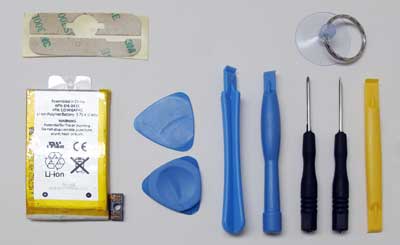
<p><img src="http://www.ruggedpcreview.com/images2/iPhone_3GS_battery_tools_400.jpg" align="right" hspace="8" vspace="8">So I ordered a six dollar replacement on eBay. It quickly arrived and even came with  set of tools that included two screw drivers, four plastic extraction tools that help opening electronics without scratching them, a suction cup with keyring, and some 3M pre-cut sticky film, presumably to replace original stickies or glue. There weren't any instructions, but those are easy to google.</p>

<p>The process of replacing an iPhone battery goes something like this: you remove two tiny screws to the left and right of the iPhone's charging connector, use a tool to pry the screen part off the housing, unclip about seven tiny connector, undo about seven tiny screws that hold the system board in place, take the system board out, and then replace the battery that sits beneath the system board. Sounds easy, but it is definitely not for the faint of heart and, honestly, beyond the micro-dexterity skills of most. I am not going to document everything with pictures as they are easy to find online.</p>

<p>The first challenge is to pry the screen loose. Do-It-Yourself tutorials on the web usually recommend using one of the plastic prying tools and some even show an Exacto knife. In my experience, the plastic tools don't easily fit into the very narrow gap between the glass and the housing and they are too soft to pry, and anything metal will leave marks on the phone. What worked for me was the suction cup with the keyring to pull. It requires a rather firm pull to get the display loose, and you have to guard against ripping the whole screen off once it lets go as that might tear some of the fragile tiny ribbon cables inside.</p>

<p>Once the screen is loose it'll still be connected to the main part of the phone with three ribbons. Matters are helped greatly by tiny labels with the numbers 1 to 7 on it, which is the sequence in which the ribbon and cable connectors are to be undone. There are also seven tiny crews holding the system board in place, one of which is covered with a sticky label that warns not to remove it. But you have to if you want to get the system board out.</p>

<p>Once all seven connectors are off and all the screws out, it's a matter of lifting out the system board (don't forget to remove the tiny screw that holds the camera assembly in place). Now everything comes out and you see the battery, which doesn't come off easy either because it's stuck to the housing with a piece of double-sided tape. You have to be careful in prying the battery loose or either the battery of the housing could get damaged.</p>

<p>Putting the replacement battery in is a piece of cake. And putting everything back together isn't too difficult either, except that, as is always the case when you take apart and put back together small electronics, you need to pay great attention to do everything in the right order, and without breaking anything. Reattaching the seven little ribbon and other connectors requires a very steady hand and triple-checking everything. One tiny ribbon, especially, is a total pain, with a super-fragile connector and no seeming way to secure it other than pushing it back in its place with tweezers, not knowing if it's in properly. </p>

<p>Once all connectors and screws seemed back in their proper places, I couldn't really see how I needed the replacement pre-cut sticky film as the screen fit back into the hosting and seemed to seal tightly. Put the two screws back in and the old iPhone looked and felt none the less for wear.</p>

<p>But would it start up with the new battery? It did. Came right up and all my data and apps were still there even though the battery had been disconnected for several minutes. I plugged the phone in to fully charge the battery. All was well. Or so I thought.</p>

<p>A while later I took the now fully charged (almost fully; the new battery somehow didn't seem to reach a point where the iPhone battery meter showed 100%) phone and began checking the apps. All worked. But then I got a message suggesting I upgrade my system software. I accepted and the iPhone began to wirelessly update its software. And soon showed the dreaded "plug me into iTunes" icon. I did and it wasn't pretty.</p>

<p>While the phone had worked perfectly well before the prompted software update, iTunes now claimed the phone needed to be restored to its original state and I could later sync to get data and settings from my backup. I had no choice than to proceed. iTunes went through the process of downloading and installing the system software, then loaded firmware and was done. The phone, though, wasn't, and suddenly there was an "unknown error (29)" message on iTunes, and iTunes declared this phone could not be restored. Ouch, ouch, ouch.</p>

<p>So I took it apart again (the second time is so much easier) to make sure I hadn't missed a connector or destroyed something. All seemed well, but upon reassembly, the phone wanted iTunes again, and the iTunes software reload resulted in the same error. So the phone was now unusable.</p>

<p>I googled the situation and eventually found a page that said "Buying or replacing a 3GS battery from anyone/anyplace other than Apple is a hit-and-miss experience" (<a href="http://modmyi.com/forums/hardware/726532-3gs-battery-replacement-successful-restore-3-1-3-4-0-1-a.html" target="_blank">see here</a>). The author claimed that some batteries will work and others will result in the "unknown error (29)." His conclusion was that an unknown or out-of-date battery APN part number caused the problem, with something in Apple's software generating the iTunes restore error. The page listed known good APN numbers, and my replacement battery was listed as working properly. But it didn't.</p>

<p>So I took it all apart again and put the old battery back in, figuring if the phone now restored properly, I had not damaged anything. And sure enough, iTunes now finished the restore, reloaded data from a backup and the phone was back to normal (minus the data I had accumulated since the last backup).</p>

<p>What is weird here is that the phone had worked just fine with the new battery before the iPhone requested a software upgrade. If the battery were bad, it would not have worked at all. But it did. After the software upgrade, the phone no longer restored with the new battery and became useless. It almost seemed as if the software upgrade refused the replacement battery that the older (but still iOS 5) software had accepted.</p>

<p>So what's the moral of the story? First, if you have the manual dexterity to work on tiny electronics, replacing an iPhone battery is not very difficult, but there is plenty of possibility to mess things up. So this is strictly a do it at your own risk proposition. Replacement batteries that look pretty much identical to the OEM battery are available for very title money on eBay and elsewhere, including tools. The price difference between the six bucks they cost and the 80+ dollars that Apple charges is very large. But apparently, the iPhone software decides which batteries will work and which won't. </p>

<p>===========</p>

<p>After this first experience with my old iPhone 3GS, I then tackled my wife's old iPhone 3G whose battery was pretty much dead and held a charge for just half an hour or so. As is so often the case with working on electronics (or cars, for that matter), the first time taking something apart and putting it back together is tough, but a second or third time is much easier. This time I never even tried to pry the screen off the iPhone with a tool that could potentially damage the phone; I simply used the suction cup to easily lift the display off the phone. </p>

<p>Inside, the iPhone 3G is almost identical with the 3GS, so if you know how to work on one, you know how to work on the other. If anything, the 3G is a bit easier because some of the tiny connectors reconnect easier. Opening the iPhone 3G, replacing the battery, and putting it back together took no more than ten minutes. Once together, it worked just fine and, so far, hasn't asked for a software upgrade. And given my experience with the 3GS software update that disabled the newly installed battery, I won't upgrade the 3G.</p>

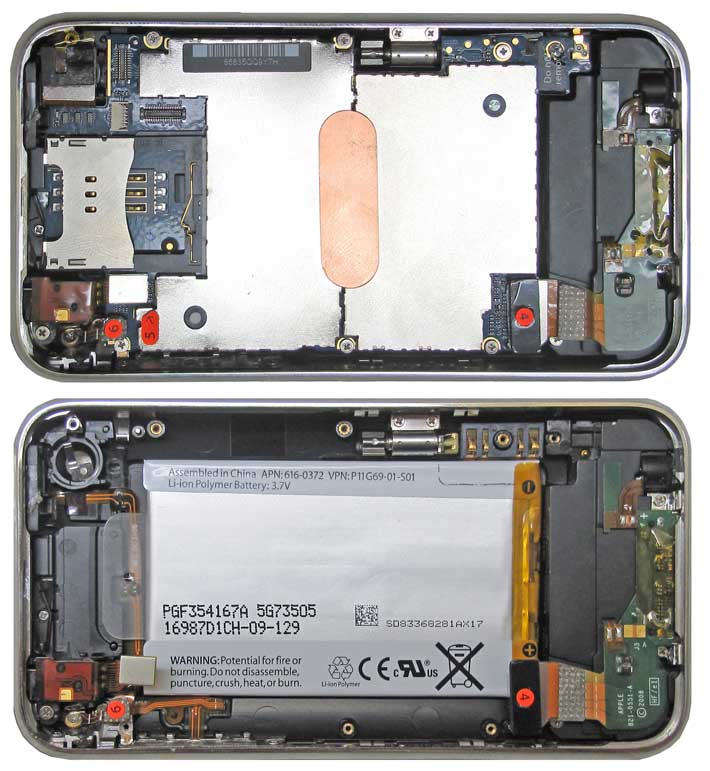
<p>Below you can see what the 3G looks like inside. On top a view onto the system board, at the bottom a view onto the battery, with the system board removed.   </p>
<p><img src="http://www.ruggedpcreview.com/images2/iphone_3g_inside_710.jpg"></p>

<p>==========</p>

<p>Update: Upon being contacted, the eBay seller of the 3GS battery (DaledGroup) said that every now and then they have a bad battery. He promptly replaced it with another one (APN 616-0434 instead of the 616-0435 that gave us trouble). That battery worked flawlessly, and also seems to hold its charge very well.</p>

<p>The 3G battery from trimming on the other hand, while working fine in the 3GS, loses its charge very quickly. </p>
<p> <br />
 </p>]]>
</content>
</entry>
<entry>
<title>The new iPad -- First impressions</title>
<link rel="alternate" type="text/html" href="http://pencomputing.com/mt_iphone/archives/2012/03/the_new_ipad_--.html" />
<modified>2012-03-18T22:28:15Z</modified>
<issued>2012-03-18T17:35:09Z</issued>
<id>tag:www.pencomputing.com,2012:/mt_iphone/11.728</id>
<created>2012-03-18T17:35:09Z</created>
<summary type="text/plain">On Friday, March 16, 2012, at 9:30AM, Fedex delivered our two new iPads. The Fedex guy actually gave us three packages by mistake. We get a lot of stuff via Fedex, but since all three looked the same, I checked...</summary>
<author>
<name>conradb212</name>

<email>cb@pencomputing.com</email>
</author>

<content type="text/html" mode="escaped" xml:lang="en" xml:base="http://www.pencomputing.com/mt_iphone/">
<![CDATA[<p>On Friday, March 16, 2012, at 9:30AM, Fedex delivered our two new iPads. The Fedex guy actually gave us three packages by mistake. We get a lot of stuff via Fedex, but since all three looked the same, I checked and saw that this was probably a third iPad. I called after the departing Fedex guy. "You saved me life," he told me as I handed him the third package back.<br />
</p>]]>
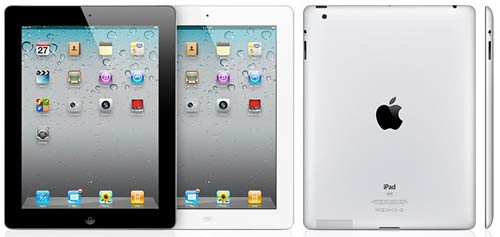
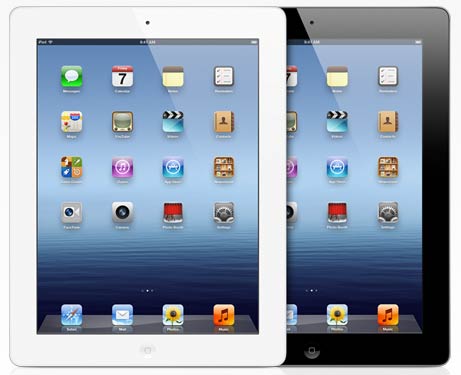
<![CDATA[<p>So then we unpack the iPads, a black one and a white one, both 4G and 64GB. At fist (and second and third) sight they look identical to the iPad 2 and essentially identical to our first generation iPads. That's understandable. Why change a design that has sold tens of millions and is copied the world over? This, of course, also means that the new iPad is as slick and slippery as its two predecessors. </p>

<p><img src="http://www.ruggedpcreview.com/images2/new_ipads.jpg" align="right" hspace="8">Apple packaging is as sparsely elegand and beautiful as ever. As for instructions, there's a single small card that simply says "<i>To start, turn on your iPad by pressing and holding the On/Off button for a few seconds. Then follow the onscreen instructions to set up your iPad</i>." That's it.</p>

<p>And so we did. The new iPad came alive. I half expected a glamorous multi media welcome, but it was all matter-of-fact. Text instantly looked incredibly sharp. The iPad then let me connect it to my WiFi, and then I had the choice to set it up as a new iPad, or restore from an iCloud or iTunes backup. I chose the latter. </p>

<p>iTunes asked if I had an Apple ID and then asked for the password. This will be an issue as in the past, we used my Apple ID for both of our iPads. Carol now wonders what would happen to all of her purchases if we had separate Apple IDs.</p>

<p>Next came an address screen and a few questions as to how and why I use iPads. Then I could select an iTunes backup. Restoring the basic system from my almost full 32GB first gen iPad would take about 15 minutes, iTunes told me.</p>

<p>The iPad then rebooted, showed 57.17GB available as only the yellow "Other" part of the data had apparently been restored to that point, and then began to sync. That took considerably longer. After about an hour, the sync seemed done. Then... no furher instructions. </p>

<p>I turned on the iPad, which made me go through picking a WiFi account and password again. Then it asked if I wanted to use voice dictation or not. Of course, at least to try it out. Now the iPad said it was ready to use. Nothing about the data plan as of yet.</p>

<p>AT&T data was there, without me having to set anything up at all. Among my first impressions was that all pictures loaded from the backup looked a bit fuzzy and low res (that later resolved itself). </p>

<p>All my apps were there, plus Photo Booth (silly) and Face Time. I quickly tried the new dictation feature where you tap on a new microphone icon in any application that accepts text entry, and the spoken word will be translated into text. As has been the case with voice recognition for the past two decades, it can work if you give it a chance and learn how to use it. But it will inevitably make hilarious mistakes if you just play around with it. Let's hope Garry Trudeau won't use it to diss the new iPad the way he relentlessly mocked the Apple Newton's handwriting recognition way back when.   </p>

<p>In Pages, none of my documents were there and I had to first copy them from iDisk. They were, however, on iCloud. Same for my Numbers and Keynote documents. I'll have to figure out how it all fits together. </p>

<p>I downloaded the US$4.99 iPhoto. It quickly inventoried all of my pics and offers a number of minor editing tools.</p>

<p>Amazingly, I wasn't as instantly wowed by the new iPad as I expected. It was simply my iPad, as it always was. </p>

<p>I hoped I could continue to use my old black portfolio case from Apple. Even though the new iPad is  bit thicker than the iPad 2, it is still thinner and shaped a bit differently than the original. I cut out a small hole for the camera in the back and also cut a piece of plastic foam for a better fit. It works, but isn't optimal.</p>

<p>What happened to the old iPad? It continued to work as before. Even AT&T 3G access was still there. I have to assume that AT&T is smart enough to disable data access once a new device has replaced an older one. Still, it's both weird and terrific that there wasn't a single question about the data plan.</p>

<p>The rest of the day was pretty much spent playing with the new iPad, going from app to app to see if they all worked and if they looked different. A big concern was how apps that were designed for 1024 x 768 resolution would look on a display with four times as many pixels, 2048 x 1536. I half expected old iPad apps to look like those upscaled iPhone apps look on an iPad: you can look at them in native format or push the "2X" button that enlarges them. None of that happened. All iPad apps looked just fine.</p>

<p>In fact, everything looked so much the same that it was hard to believe that one was the original and one the latest and greatest. Operating was definitely quicker though. The original iPad wasn't slow at all, but what usually happens with a technlogy is that it's being challenged more by software developers as time goes on, and so after a while the device feels slower because it has to drive much larger apps. In a way, the new iPad makes the platform as snappy again as it once was.</p>

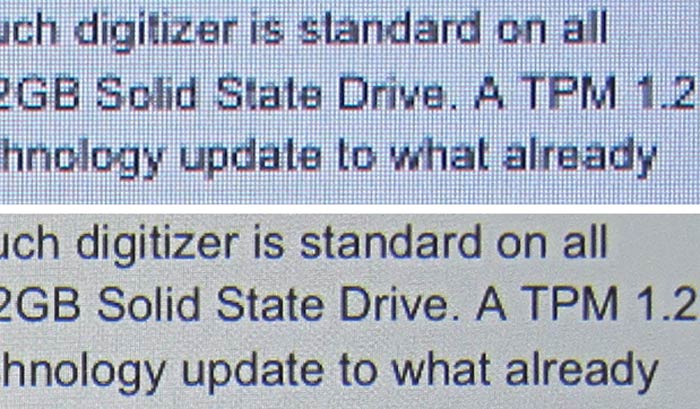
<p>The screen? It's terrific. I did not have the almost religious experiences that some iPad reviewers descibed, but the screen is definitely great. It does have an overall more yellowish hue to it than the original, but you only notice that side-by-side. What you do notice is that everything is so very crisp. That especially goes for very small text in web pages and such, where we've simply come to expect a bit of fuzziness on virtually any computer. That is gone. The text is now so sharp that sometimes it almost feels as if it had too much contrast. </p>

<p>That, however, would not give Apple's latest display enough credit. While the new iPad feels an incremental improvement, the screen finally brings display technology to an entirely new level. After decades of constant improvements, it was easy to believe it was as good as it'd ever get. But up to now you could always see pixels on a screen. The pixels are gone. The new iPad's display is probably pretty much as good as it'll ever get. </p>

<p>The same cannot be said of the display surface. While the text and pictures now look as good or better than print, print doesn't have a near mirror-like finish. The gloss and reflection are as bad as ever.</p>

<p>After several hours of using the new iPad, I finally got a message from AT&T in the form of a screen that popped up and asked me to activate data service. That turned out to be surprisingly painless. Log into the existing account, select a data plan (and yes, the unlimited plan for those who had it before was still available), wait a few minutes, and then data was back. And I occasionally saw a "4G" where it usually says "3G" for data service.</p>

<p>Celluar data still seemed to work on the old iPad, but when I logged into the AT&T Cellular Data screen, I only had the option to sign up for one of the three current plans, i.e. 250MB, 3GB or 5GB, so presumably data stopped working on my trusted old iPad and I'd have to sign up a new data plan if I wanted to continue using it.</p>

<p>I had planned on taking comparison screen shots, but frankly, all you need to do is look at the picture below. It shows macro shots taken by a Canon G10 camera of the same very small text on an original iPad and on the new iPad. Everything's sharper. </p>

<p><img src="http://www.ruggedpcreview.com/images2/ipad_resolution_old_vs_new.jpg"></p>

<p>As far as battery life goes, again there is no noticeable difference between the original iPad and the new one. Which means battery life is almost never an issue. You just use the iPad until it becomes advisable to charge it, which can be days. In that respect, the iPad is much more like a car than a conventional laptop. The battery, by the way, packs a full 42.5 watt-hours as compared to the 25 watt-hours of the original iPad and the iPad 2. Despite the larger battery and higher power draw, the new iPad never warms up.</p>

<p>We went to Best Buy to get a new case for Carol's white iPad since she didn't like the looseness of the device when using it in the old black Apple portfolio case. Given the superb utility of the stealthy portfolio case, it's odd that Apple isn't offering one for the iPad 2 and the new iPad. Carol didn't like the colorful magnetic "Smart Covers" since they do not protect the backside of the iPad. So she bought a Griffin Elan Folio Case that's designed for the iPad 2 but works just fine for the new iPad.</p>

<p>So what will happen to our old iPads? When I checked eBay a few days before the release of the new iPad, eBay offered US$310 for a 32GB original 3G iPad. That went down by a hundred bucks as soon as the new iPads began shipping. That isn't very much for our pristine iPads that never spent a day outside their case, and with all the original box and packaging still there. So we're not sure yet what to do with them. </p>

<p>So there. The new iPad. I am glad we got them. The extra speed comes in handy and restores the sense of snappiness of the original iPad when all it had to do was drive the simple initial apps. Having the cameras is fun, and the new "retina" display simply redefines the bar for what a display should be. Being able to take decent quality pictures and HD video on an incredibly crisp 9.7-inch screen makes any dedicated camera look a bit weird.<br />
</p>]]>
</content>
</entry>
<entry>
<title>Should I get the new iPhone 4S?</title>
<link rel="alternate" type="text/html" href="http://pencomputing.com/mt_iphone/archives/2011/10/should_i_get_th.html" />
<modified>2011-10-07T17:46:05Z</modified>
<issued>2011-10-07T17:10:26Z</issued>
<id>tag:www.pencomputing.com,2011:/mt_iphone/11.654</id>
<created>2011-10-07T17:10:26Z</created>
<summary type="text/plain">My wife and I write about technology for a living, and so it behooves us to stay up-to-date and always carry around the latest and greatest. Yet, I still have my old iPhone 3GS, and my wife hasn&apos;t yet complained...</summary>
<author>
<name>conradb212</name>

<email>cb@pencomputing.com</email>
</author>

<content type="text/html" mode="escaped" xml:lang="en" xml:base="http://www.pencomputing.com/mt_iphone/">
<![CDATA[<p>My wife and I write about technology for a living, and so it behooves us to stay up-to-date and always carry around the latest and greatest. Yet, I still have my old iPhone 3GS, and my wife hasn't yet complained about her lowly 3G. Truth be told, what both of us anticipated more than the new iPhone was getting off the AT&T contract. We're both off contract now, so that's good. However, why is it that we're told new phones are subsidized and are essentially paid off during that 2-year contract commitment when the charges stay the same when the contract ends? That's as if you're paying the bank a monthly sum for your mortgage, taxes and maintenance, and then the bank continues to charge you the same when the mortgage is paid off!</p>]]>
<![CDATA[<p>Anyway, we're off contract and, like everyone else, had been looking forward to the iPhone 5. A big step forward would make signing up with AT&T a bit less unbearable. But now it's just the iPhone 4S, not a new 5. So what should we do?</p>

<p>Get the new iPhone 4S anyway? More speed is always good, though I never felt my 3GS is slow, and I actually never felt my original iPhone was slow. Getting a better camera and 1080p HD video? That, too, is nice, but I still have my doubts that even the new 4S will do the job of the dedicated little digital camera I almost always carry with me. Siri? I know the media swoons about it, but I feel zero need to have my iPhone talk to me. Really sounds more like a Newton Intelligence redux to me.</p>

<p>But if I were to go for the new iPhone 4S, should I get the $199 16GB model, given that I never come close to filling up the 8GB in my 3GS? Or pay $299 or even a hefty $399 for 32 or 64GB? My guess is that the new phone fills up much more quickly because of the much larger still and video files. So getting the base model may end up being frustrating.</p>

<p>So why not just get the iPhone 4 that now goes for just $99? It'd still be a great upgrade for us, what with the retina display and all? It's an attractive thought, but then we'd sign a 2-year contract to pay off an essentially obsolete phone. And every time I'd use the phone I'd be reminded that I didn't spring for the extra hundred or two hundred bucks to get the dual processor and whatever else is new in the 4S.</p>

<p>Or should we just stay with our old phones? They do the job and we've never found them lacking (other than the often lousy voice quality). But paying almost $200 per month for two old phones that are off contract seems an awful lot. And ever since we got iPads, we use those for almost all the non-phone stuff we used to use our iPhones for.</p>

<p>Right now I am leaning towards waiting for the iPhone 5 and continuing to pay AT&T their King's ransom for off-contract phones. I wish I weren't in this situation of having to choose from less than thrilling options.   <br />
 </p>]]>
</content>
</entry>
<entry>
<title>Steve</title>
<link rel="alternate" type="text/html" href="http://pencomputing.com/mt_iphone/archives/2011/10/steve.html" />
<modified>2011-10-06T05:37:09Z</modified>
<issued>2011-10-06T05:34:47Z</issued>
<id>tag:www.pencomputing.com,2011:/mt_iphone/11.653</id>
<created>2011-10-06T05:34:47Z</created>
<summary type="text/plain">In 1996, I wrote the below and published it in Pen Computing Magazine. Bring Back Steve It&apos;d be good for Apple (though possibly bad for Newton) I wasn&apos;t surprised when Gil Amelio was canned at Apple. He may have contributed...</summary>
<author>
<name>conradb212</name>

<email>cb@pencomputing.com</email>
</author>

<content type="text/html" mode="escaped" xml:lang="en" xml:base="http://www.pencomputing.com/mt_iphone/">
<![CDATA[<p>In 1996, I wrote the below and published it in Pen Computing Magazine.</p>

<p>Bring Back Steve</p>

<p>It'd be good for Apple (though possibly bad for Newton)</p>

<p>I wasn't surprised when Gil Amelio was canned at Apple. He may have contributed in getting Apple better organized, but market share kept slipping, and he could not provide a compelling vision. Neither could Lou Gerstner at IBM, for that matter, but he had the managerial presence (and a good deal of luck) to establish himself as IBM's savior and undisputed leader. Gil Amelio didn't. Fortunately, after all these years, Apple's board is still strong enough to take swift and drastic action when the situation requires it.</p>

<p>So, who's next? Traditional business executives just don't seem to cut it at Apple. Sculley didn't work, Spindler didn't work, and Amelio didn't work. They were all fine managers and executives that could do a world of good for almost every other big US business, but Apple is different. Apple's success has always been based on that elusive combination of conjuring up an exciting vision of the future and then embodying it in elegant technical solutions. Apple is about vision, imagination, and products people want and desire. When was the last time anyone desired Windows?</p>

<p>So let's get Steven Jobs back at Apple's helm. There's no one who can fire up the imagination like he can. No one does a better presentation. He may not be the best manager in the world, or the easiest to get along with, but so what? Who else can claim his accomplishments? He co-founded Apple and an entire industry, he created a superb product like the Macintosh. After his departure from Apple he started another company, Next, and was smart enough to change the mission of the company when it become obvious that being in the hardware business didn't work out. He then snatched victory from the jaws of defeat by selling his Next technology to Apple for almost half a billion dollars. While doing all this, he also had the foresight to invest in Pixar and made another fortune when that company went public. Founding Apple was not a flash in the pan. He's one of the truly great innovators of this age, he knows how to run a business and make it successful, and he doesn't throw in the towel when things go badly.</p>

<p>Jobs started Apple, and it would be only right to see him at the helm once again. The upside is that he'd immediately provide the company with a huge boost just by being back. He'd energize the legions of loyal Mac devotees, and most probably recruit many new ones (remember, who really loves Windows?). And since Apple is about to include Next technology into its next generation of computers, who knows it better than Jobs? The downside? Even with Jobs, Apple could still flounder and die. But under whose leadership would you rather see Apple go down? Yet another faceless manager, or the very man who started it all?</p>

<p>Let's get Steven Jobs back, even if it means hard times for the Newton.</p>

<p>---</p>

<p>Steve Jobs died today, October 5, 2011. He was only 56. </p>]]>

</content>
</entry>
<entry>
<title>Using a SwissCom data plan for the iPad when visiting Switzerland</title>
<link rel="alternate" type="text/html" href="http://pencomputing.com/mt_iphone/archives/2011/07/using_a_swissco.html" />
<modified>2011-07-23T02:21:18Z</modified>
<issued>2011-07-23T02:20:32Z</issued>
<id>tag:www.pencomputing.com,2011:/mt_iphone/11.619</id>
<created>2011-07-23T02:20:32Z</created>
<summary type="text/plain">I always take my iPad with me when I travel, but traveling abroad is a mixed blessing because thanks to AT&amp;T&apos;s exorbitant charges for data service I&apos;m usually limited to hunting for free WiFi hotspots. Last time I arrived in...</summary>
<author>
<name>conradb212</name>

<email>cb@pencomputing.com</email>
</author>

<content type="text/html" mode="escaped" xml:lang="en" xml:base="http://www.pencomputing.com/mt_iphone/">
<![CDATA[<p>I always take my iPad with me when I travel, but traveling abroad is a mixed blessing because thanks to AT&T's exorbitant charges for data service I'm usually limited to hunting for free WiFi hotspots. Last time I arrived in Mexico, AT&T informed me via text that it'd cost me $20/meg for data, which is insane. There are, of course, the "super affordable" (according to AT&T) international data plans/packages you can sign up for, but even that costs $100/month for 275meg, or six times as much as the $15/250meg domestic plan. And 275meg doesn't get you nearly as far as AT&T would like you to believe.<br />
</p>]]>
<![CDATA[<p>So when I traveled to Switzerland for ten days, I decided to simply get a SwissCom SIM upon arrival (a SwissCom store is right in the airport). SwissCom charged me 20 Swiss francs for the SIM, but that included a 20 franc credit, so the SIM was free. Prepaid monthly data plans are 19 francs for 300MB or 39 francs for 2GB. I took the latter. The paperwork took 15 minutes and I was on my way. SwissCom has excellent coverage in Switzerland and being able to use the iPad without having to worry about running into the limit or incurring huge AT&T charges was terrific. This way I could use my iPad as a GPS (Hertz failed to deliver the promised GPS in my rental), browse as much as I wanted and needed, and also use a couple of very helpful apps (ZVV Fahrplan and Wemlin) to navgate the terriific public transportation system in Switzerland.</p>

<p>Getting a SIM card for a particular country doesn't make sense for those who travel through multiple countries, but it's a very economical solution if you vacation in one place.  </p>]]>
</content>
</entry>
<entry>
<title>Should I upgrade my iPhone and iPad?</title>
<link rel="alternate" type="text/html" href="http://pencomputing.com/mt_iphone/archives/2011/04/should_i_upgrad.html" />
<modified>2011-04-29T18:35:45Z</modified>
<issued>2011-04-29T18:30:54Z</issued>
<id>tag:www.pencomputing.com,2011:/mt_iphone/11.588</id>
<created>2011-04-29T18:30:54Z</created>
<summary type="text/plain">I really can&apos;t live without my iPhone and iPad. And as a professional publisher, writer and editor, I pride myself in always having, and knowing about, the latest gear. So it&apos;s pretty strange that I still have a lowly iPhone...</summary>
<author>
<name>conradb212</name>

<email>cb@pencomputing.com</email>
</author>

<content type="text/html" mode="escaped" xml:lang="en" xml:base="http://www.pencomputing.com/mt_iphone/">
<![CDATA[<p>I really can't live without my iPhone and iPad. And as a professional publisher, writer and editor, I pride myself in always having, and knowing about, the latest gear. So it's pretty strange that I still have a lowly iPhone 3Gs and a first generation iPad. I mean, the iPhone 4 has been out forever, and there's already plenty of buzz about the iPhone 5. And the second gen iPad has also been out of a while. So what's going here?</p>]]>
<![CDATA[<p>First, the iPhone. Sometimes it's little things that make you hang on to a product. In my case, I was stupid enough not to get a case for my 3Gs because I just love the sleek feel of it. But then it dropped out of my pocket as I got out of my car and fell flat on its screen onto concrete. It didn't break, but there are a couple of chips, which means I really can't sell it. So there. Else, I'd love to upgrade to the iPhone 4, but I am also just about done with my 2-year AT&T contract, and the prospect of being a captive AT&T customer for another two years, whether I like it or not, is unpleasant. Should I just ditch AT&T and go with Verizon? Verizon's reputation is a bit better and I really don't care whether I can talk and look up stuff at the same time, but then it's another 2-year contract and so it's perhaps a "better the devil you know than the devil you don't" kind of thing. Overall, I love and adore the iPhone, but not its voice quality and not those infuriating 2-year contracts.  </p>

<p>As for the iPad, I watched Steve Job do the introduction of the iPad 2 and would have ordered two right that day, had they been available for order. They weren't, and though the iPad 2 looks like a wonderful device, the one I have is already wonderful. More speed is always better, but the original iPad is already pretty fast, and while I'd like to have the cameras of the iPad 2, I really don't miss them on the old iPad. I actually use the camera in the iPhone a lot, mostly to document stuff, but I know I wouldn't use the iPad 2 camera nearly as much because you can't stick an iPad into your pocket, and I already have a bunch of dedicated cameras.</p>

<p>So right now I am in limbo; my old iPhone and iPad still work well enough, but they'll get older and new apps built for newer hardware will soon make my gear too slow to run them properly. I know my loathing of the telco 2-year contracts is in part irrational, but it just irks me that they do that. And every time I think how I can't even take my AT&T gear out of the country without special services and risking giant bills, I feel like the less I need to deal with AT&T, the better. On the other hand, the lure of new and better technology is great, and so I wonder how long it'll be until I give in. </p>]]>
</content>
</entry>
<entry>
<title>Apple&apos;s iPad 2 -- Upping the ante</title>
<link rel="alternate" type="text/html" href="http://pencomputing.com/mt_iphone/archives/2011/03/apples_ipad_2.html" />
<modified>2011-03-15T17:01:55Z</modified>
<issued>2011-03-03T15:41:42Z</issued>
<id>tag:www.pencomputing.com,2011:/mt_iphone/11.555</id>
<created>2011-03-03T15:41:42Z</created>
<summary type="text/plain">Steve Jobs announced the iPad 2 on March 2. No one expected Jobs to do it himself as he&apos;s been on a medical leave of absence for a while now. He looked none the worse for wear, though I can&apos;t...</summary>
<author>
<name>conradb212</name>

<email>cb@pencomputing.com</email>
</author>

<content type="text/html" mode="escaped" xml:lang="en" xml:base="http://www.pencomputing.com/mt_iphone/">
<![CDATA[<p>Steve Jobs announced the iPad 2 on March 2. No one expected Jobs to do it himself as he's been on a medical leave of absence for a while now. He looked none the worse for wear, though I can't imagine that things are very good for him.</p>

<p>The iPad 2, of course, was expected, though it's hard to argue that it was already necessary. Apple sold about 15 million iPads in 2010 (in nine months, really, as the iPad didn't start selling until April), and demand keeps growing. Apple also wasn't pressured by the competition, which largely remains on the drawing board or early stages of deployment.</p>]]>
<![CDATA[<p>Anyway, the new iPad looks almost exactly the same as the original, but it is considerably thinner (0.35 vs 0.5 inches) and weighs less (1.3 lbs. vs 1.5 lbs.). Though I never felt that way, there's been criticism about the iPad's weight, and so the small but noticeable reduction addresses those concerns.</p>

<p><img src="http://www.ruggedpcreview.com/images2/news_ipad2_400.jpg" align="right" hspace="8">The iPad2 will be powered by a 1GHz dual core Apple A5 processor that, according to Jobs, is twice as fast and offers 9x graphics performance. No one is entirely sure about the specifics of Apple's processors (the Apple A4 chip that powered the original iPad is based on the ubiquitous ARM Cortex-A8 core, special PowerVR-technology graphics, plus Apple's special sauce, and it's manufactured by Samsung). The new A5 chip has dual cores, is still running at the same 1GHz clock speed, and presumably has much more powerful graphics processors. I never felt the original iPad was lacking in speed (whatever hangups there were always seemed AT&T related), but experience with the iPhone has shown that news apps designed for newer technology will quickly make older hardware feel slow.</p>
<p>One area where the iPad has been taking heavy criticism is its lack of a camera. Virtually all smartphones have cameras now (heck, it's gotten to a point where world history is being captured on smartphones), and many of the emerging iPad competitors have a camera or even two (one to take pictures, the other for video conferencing).</p>

<p>Well, there are now two cameras. Apple didn't specify megapixel, but stated that the one in front records video and stills at VGA resolution, and the one in the rear at up to 720p. VGA, of course, is 640 x 480 pixel, or 0.3 megapixel. 720p  is what one might call "HD light." It's the definition used by some of the less expensive, smaller screen HDTVs and nominally refers to 1280 x 720 pixel resolution (though it's also used for the 1366 x 768 res often seen in such TVs). So that's around one megapixel. The competition will almost certainly diss Apple for the relatively low resolution of the iPad 2 cameras (there are tablets with 3 and 5-megapixel cameras), but Apple's decision makes total sense to me: for video conferencing there's simply no need to capture and process more pixels than you need. And for shooting 720p video, it's not necessary either. Apple correctly decided to go for best speed and usability as opposed to shoehorning a full digital camera into the iPad 2.</p>

<p>Expect the iPad 2 to be much more aware of its position and movement. That's because it includes a gyroscope. Gyroscopes are much better and more comprehensive at sensing movement than simple accelerometers. That means we'll soon see a new generation of 3D games and other software that'll take advantage of it.</p>

<p>More speed and power often comes at the cost of either a bigger, heavier battery or, if that is not possible, less battery life. Apple claims the same battery life for the iPad 2 (around ten hours) as for the original. And that even though the new device is both thinner and lighter, and even though the capacity of the 3.8V battery remains at 25 watt-hours. Well, no one believed it when Apple claimed ten hours of battery life for the original, and yet it was true. So I believe Apple's projections.</p>

<p>The new iPad still has neither a card slot nor a standard USB port. Apple (or Jobs, really) has always been very dogmatic about ports and interfacing, and for the most part, that has never bothered me. I do appreciate that they finally added an SD Card slot in recent iMacs, but I never much missed a slot in the iPad (I do have all the appropriate adapters, though). One new thing is that the iPad 2 supports HDMI-out via cable, which means you'll be able to see what's on the iPad screen on a HDTV, and unlike the original VGA adapter, this one is said to work with all apps.  </p>

<p>While the original iPad came in different memory configuration and either with or without 3G, the iPad 2 offers many more permutations by adding your choice of colors (black or white) and network technology (AT&T or Verizon) to the mix. Color really doesn't matter to me (my iPad spent most of its life in Apple's terrific "elephant leather" case anyway), but the choice of networks opens things up considerably. Apple did not say what data plans would be available and how much they'd cost, probably because they know as well as anyone that having to deal with telcos is the low and sore point of the tablet experience.</p>

<p>On the software side, Apple announced and demoed iMovie and GarageBand for the iPad. I am not a musician and so have no appreciation for the apparently amazing capabilities of Garage Band, but iMove certainly looks interesting. And for US$4.99 each, a total steal, millions will get both apps.</p>

<p>Of note: the display apparently did not change. It's a different model from LG Phillips, but still measures 9.7 inches diagonally and has 1024 x 768 pixels. So no new "retina" style display with stupendously high resolution. That'll likely come in the next iteration of the iPad. No big deal. I never felt the original iPad's display resolution was lacking. A much more pressing problem, though, remains unaddressed: gloss and reflection. Though the original iPad was relatively immune to fingerprint smudges, enough of the unsightly grease went through to be an embarrassing nuisance. The iPad 2 specs state "fingerprint-resistant oleophobic coating," but whether it's an improvement over the original or not is unclear; Jobs didn't address that. The gloss and reflection, likewise, probably remain. That is a bit of a downer as no one I know enjoys a glossy, reflective screen (one of tech's most dubious developments over the past few years). </p>

<p>Pricing remains exactly the same as for the original iPad: US$499 (16GB), US$599 (32GB), US$699 (64GB) for the WiFi-ony versions, and US$130 more for 3G versions. That's probably as expected, and it is certain to give iPad competitors even more intestinal gas than they already have: while for years it was easy to dismiss Apple products based on their price premium, that's simply not the case with the iPad. In fact, as if coming close to offering a competitive tablet product weren't difficult enough, meeting or beating Apples pricing and still make a profit seems near impossible.  </p>

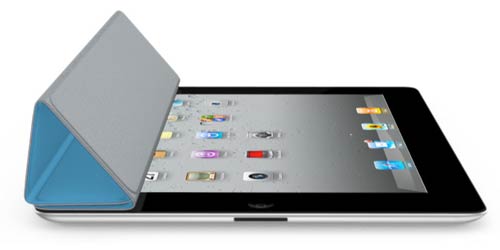
<p><img src="http://www.ruggedpcreview.com/images2/ipad2_cover.jpg" align="right">One thing I'll be certain to miss on the iPad 2 (yes, I'll get one as soon as I can) is the old black "elephant skin" case. Jobs made the very reasonable point that they didn't design this beautifully slender new tablet just to then hide it in a thick cover, and introduced what Apple calls the "Smart Cover" for the new iPad. Unlike the old cases, the Smart Cover uses a hinge and only covers the front of the iPad 2. It's cleverly designed to be used as a stand. And it has magnets that automatically turn the iPad 2 on and off. The new covers (which are sold separately) come in either polyurethane in five bright colors ("Hey bad guys! I carry a super-cool $800 gadget!") or leather in five somewhat more subdued colors. Me, I'll probably opt for something that covers and protects my iPad 2 both front and back. </p>

<p>The new iPad 2 will be available March 11, 2011, in the US, and March 25 in much of the rest of the world. I'd have ordered mine instantly, but apparently you can't even place a order before March 11 though Apple surely could have bagged a huge number of pre-orders. Such is Apple's clout and confidence in the iPad 2. And things just got that much harder for anyone else. I mean, how can you compete with the iPad 2's hardware and price? All that appears left is a better spec here and there, and, more importantly, competing software platforms' own merits.</p>

<p>[See <a href="http://www.apple.com/ipad/specs/">iPad 2 specs</a> and see <a href="http://www.ruggedpcreview.com/pdfs/media_tablets_2011_ruggedpcreview.pdf" target="_blank">how the iPad 2 compares to the competition</a>.]  </p>]]>
</content>
</entry>
<entry>
<title>The best of times, the worst of times</title>
<link rel="alternate" type="text/html" href="http://pencomputing.com/mt_iphone/archives/2011/01/the_best_of_tim.html" />
<modified>2011-03-03T15:41:31Z</modified>
<issued>2011-01-28T16:04:37Z</issued>
<id>tag:www.pencomputing.com,2011:/mt_iphone/11.542</id>
<created>2011-01-28T16:04:37Z</created>
<summary type="text/plain">I don&apos;t even know how many apps I&apos;ve bought for my iPhone, but it&apos;s quite a few. It&apos;s just so wonderfully easy to see something you like and buy it, and it instantly downloads into your iPhone. No waiting, no...</summary>
<author>
<name>conradb212</name>

<email>cb@pencomputing.com</email>
</author>

<content type="text/html" mode="escaped" xml:lang="en" xml:base="http://www.pencomputing.com/mt_iphone/">
<![CDATA[<p>I don't even know how many apps I've bought for my iPhone, but it's quite a few. It's just so wonderfully easy to see something you like and buy it, and it instantly downloads into your iPhone. No waiting, no confirmation emails, no authorization codes, no activation links. Apps just download, install and work. And since apps are so inexpensive, I don't even keep track of how much I am spending on them. It's not a lot, and even if I end up not using or liking an app, it's no big deal (those reviews that froth at the mouth and demand their 99 cents back amuse me). </p>]]>
<![CDATA[<p>The value I am getting from apps is just tremendous. For every time I use my iPhone as an actual phone, I use it ten times to use an app. Apps are so ridiculously convenient and easy to use that I'd never dream using a similar widget on my iMac instead (let alone a Windows machine). I marvel at how far we've come from the early days of the personal computer where in terms of software you had to have a word processor, a spreadsheet and a database, and each cost US$495, in 1982 dollars. I think what's happening more and more is that iPhones and iPads (and their competitive near/wannabe-equivalents out there) are becoming the personal computers, and what used to be PCs are now the big, complex machines we use for the job. It's a very interesting differentiation, and one Microsoft with its Windows everywhere! mantra still doesn't understand.</p>

<p>The one fly in the ointment -- and it's really more like a big, fat rat -- is the telcos. They need to go. Everything I love about the iPhone comes from Apple. Everything I hate about it comes from AT&T. And I don't think that'd change much if I switched to Verizon. For while the lousy service, bad voice quality, dropped calls, slow and inconsistent data are all a nuisance, the biggest nuisance is having the telcos part of the deal in the first place. Telcos don't get it, and they'll never get it. Every time I get another huge AT&T bill, with pages and pages of nickel and diming, and all those extra charges and fees and taxes and more fees, I so wish Apple handled that part, too. </p>

<p>It's quite interesting that the iPhone is made by the coolest and most admired company on the planet, but relies on arguably one of the uncoolest, least admired companies for "service." Interestingly, some of the pioneers in this market foresaw the predicament some ten years ago and started the likes of Omnisky, Yada Yada. And though they were "on our side," none survived because people didn't want to pay $40 per month for wireless data service. As a result, the telcos got a chance to take over, and the rest is history.  </p>

<p>So it's the proverbial best of times and the worst of times. We have wonderful technology that will only get better from one of the greatest companies ever, but it comes at the price of having to deal with one of the worst companies ever, one that openly hates its customers, one whose lame commercials are an embarrassment, and one whose utter, callous ineptitude is simply baffling. </p>]]>
</content>
</entry>
<entry>
<title>IPad on the road, Part V</title>
<link rel="alternate" type="text/html" href="http://pencomputing.com/mt_iphone/archives/2010/12/ipad_on_the_roa_4.html" />
<modified>2010-12-15T17:37:09Z</modified>
<issued>2010-12-15T17:36:06Z</issued>
<id>tag:www.pencomputing.com,2010:/mt_iphone/11.515</id>
<created>2010-12-15T17:36:06Z</created>
<summary type="text/plain">Another road trip for the iPad. Carol and I flew to Tennessee for an extended Thanksgiving weekend, which meant I had to take along my electronic gear. We both packed our iPads, cameras, iPhones, and I also took along my...</summary>
<author>
<name>conradb212</name>

<email>cb@pencomputing.com</email>
</author>

<content type="text/html" mode="escaped" xml:lang="en" xml:base="http://www.pencomputing.com/mt_iphone/">
<![CDATA[<p>Another road trip for the iPad. Carol and I flew to Tennessee for an extended Thanksgiving weekend, which meant I had to take along my electronic gear. We both packed our iPads, cameras, iPhones, and I also took along my big MacBook Pro. </p>]]>
<![CDATA[<p>Apparently, reporting lousy 3G coverage to AT&T can work. I had used AT&T's trouble reporting app to send several complaints about virtually non-existent service in Maryville, Tennessee. It took AT&T a while, but then I got a message announcing a service upgrade there, and low and behold, service was now better and faster than in my home in Folsom, California.</p>

<p>Just prior to the trip I had upgraded my iPad to iOS version 4.2. Truth be told, I really didn't notice anything earth-shattering. There’s the new Games icon on the home page that invited me to buy games. There's the ability to create folders by dropping one icon onto another and then naming the folder, a feature that I am using on my iPhone, but hardly consider invaluable. You can supposedly print wirelessly, but from what I read only to a very limited number of wireless printers at this point. And you can do multitasking.</p>

<p>The latter does have potential, but so far it is really nothing more than that. I must also admit that I actually had to Google to see how multitasking works. It had not occurred to me that clicking the iPad's hardware button twice would access the multitasking bar at the bottom of the display. When I did it for the first time, I found dozens of apps open and waiting. The idea here is that you then tap on one and it fluently opens to where you left off with it. That comes in handy when you quickly want to look something up, or copy something from somewhere else. Problem is, it doesn't work with all apps. I often use USA Today, for example, and it takes just as eternally long to open it via multitasking as without. And it never goes back to where I left off. The sad truth seems to be that the very thing that makes the iPad so sleek and compelling, its uncluttered simplicity, also makes it unsuitable for multitasking.</p>

<p>Halfway through the trip, Carol's iPad developed a problem. Without warning or trauma of any kind, it stopped charging fully and instead displayed a "not charging" warning when plugged in. I tried all the usual, like restarting, full cold boot, etc., but to no avail. I googled the situation and found nothing but a flurry of references to a media incident last April or so when someone found out that the iPad displays the "not charging" message when plugged into a computer via USB. People had found that the iPads were, in fact, charging, but only very slowly and only to a certain point. Turns out, that’s what was happening to Carol's iPad. It seemed to think it was plugged into a USB port for charging, and not to its genuine iPad charger (yes, I tried several chargers and outlets). So it's a visit to an Apple store genius. I do hope Apple manages to fix that, what with Apple's measly 90 day warranty.</p>

<p>While Carol's iPad is a 3G model, she's mostly using it in our home or office and so we're not subscribing to AT&T's expensive yet so very limited data plan. Instead, we sign up for the 250mb plan for her whenever we go on the road. Turns out, 250mb is woefully inadequate for just about anything. She ran out after just a few of days of fairly light use. These metered data plans must be an incredible cash cow for the telcos, and will be ever more so as Netflix and everyone else is steering to a streaming and downloading everything future. How AT&T is getting away with this rip-off pricing is beyond me. But I am certain we'll be hearing more whining from AT&T on how all those iPhone and iPad customers are using up so much of their bandwidth, and how it's only fair to everyone else to limit them, etc., etc..</p>

<p>I thought I could live with the iPad keyboard, but I really can't. Yes, it's better than any other, in part because it has no hesitation and in part because it is so uncluttered. But uncluttered also means I have to shift into the numeric keyboard for far to much, and the complete lack of tactile feedback means I am hitting the wrong key far too often or, worse, I get a key from the lower row when I want a space. There has got to be some clever programing that could make the iPad keyboard less error-prone. Like, when two perfectly okay words are connected by an "n", it shouldn't be too difficult to figure out to put in a space. And some of the predictive word choices remind of the early Newton.</p>

<p>Once again, I hardly ever used the MacBook. There was no WiFi where we stayed and so I had no Internet access with the MacBook, something that any modern computer really needs to function. So I did almost all of my email and browsing on the iPad. I used the MacBook only twice. Once to upload about 200 pictures from Carol's Canon Rebel 2Ti, because loading the Canon's 18 megapixel pics into the iPad was painfully slow. And another time I went to a Starbucks and spent three hours really working, with real multitasking and all he windows I need to collect and compose data and post it online. Yes, it could somehow be done on the iPad, but it is not really feasible.</p>

<p>On the trip I ran into an elderly couple. He is 90 and a former chemical engineer. She is 82 and still an elegant Southern Belle. Both are still sharp as tacks, and they use an iPad. There a hundreds of apps on it, and they use the iPad for everything. While he is very computer savvy, she is not, yet loves the iPad and has no problem using it. That alone tells a story. </p>

<p>When we started the trip on Thanksgiving Day, we had to get up at 3am and so I forgot to take along a book to read. Yes, as long as ebook readers are considered dangerous enough to aircraft safety so as to have to be turned off while taxiing, on ascent, on descent, etc., an ebook is no full paperback replacement. The bookstore at the airport wasn't open yet and so I got on Amazon to download a couple of books. I ended up with three scifi books that had good reviews. Well, those reviews must have been written by friends and family, as the books were nowhere near ready for primetime. If Amazon wants to truly popularize ebooks, they need to impose quality standards or at least some sort of rating system. I need to know if I am buying some sort of amateur project or a real, edited book. As is, I got two short stories with all to many glitches and errors.</p>

<p>Battery life continues to dazzle. It simply never is an issue. That alone makes the iPad different and so much more useful. I know I will not run out of juice.</p>

<p>iTunes wouldn’t even recognize Carol’s wounded, non-charging iPad, so she couldn’t make the recommended backup before going to see a genius at the Apple store. The friendly dude at the Apple store also could not get it to connect to any of their Macs, and so she got a replacement iPad. Moral of the story: iPads apparently can fail, so make sure to do frequent backups! </p>]]>
</content>
</entry>
<entry>
<title>Why I may not use an iPhone much longer</title>
<link rel="alternate" type="text/html" href="http://pencomputing.com/mt_iphone/archives/2010/08/why_i_may_not_u.html" />
<modified>2010-08-09T16:07:18Z</modified>
<issued>2010-08-09T16:00:27Z</issued>
<id>tag:www.pencomputing.com,2010:/mt_iphone/11.438</id>
<created>2010-08-09T16:00:27Z</created>
<summary type="text/plain">Yes I know, provocative title. But I didn&apos;t choose it to add to the anti-iPhone chorus and litany championed by legacy publications like PC World. And I also didn&apos;t choose it to tell you about the latest HTC Awesome or...</summary>
<author>
<name>conradb212</name>

<email>cb@pencomputing.com</email>
</author>

<content type="text/html" mode="escaped" xml:lang="en" xml:base="http://www.pencomputing.com/mt_iphone/">
<![CDATA[<p>Yes I know, provocative title. But I didn't choose it to add to the anti-iPhone chorus and litany championed by legacy publications like PC World. And I also didn't choose it to tell you about the latest HTC Awesome or Droid Maxximus that outdoes the iPhone in this spec or that. I didn't even choose it because I have become a convert to Android, though as a professional reviewer I am certainly interested in that latest and apparently finally successful mobile Linux implementation. </p>]]>
<![CDATA[<p>I did choose the title because over the past several months I've found myself using my iPhone less and less. Coincidentally, I got my iPad several months ago. Yes, I've found myself using my iPad more and more, and my iPhone less and less. That's because the iPad does almost everything I used my iPhone for, only better. I love apps on the iPhone, but I love apps on the iPad better. I used to marvel how much could be done on a screen as small as the iPhones. Now I marvel that I used to spend so much time squinting at that little screen, like reading entire books on it.</p>

<p>Before I go any farther, I do need to state that I am not fond of phones of any kind. In fact, I hate phones. I hate the way people drop everything to answer a phone call. I hate the "but.., but..., it could be an emergency" people say in justification of picking up the tenth call during lunch or in a meeting. I hate the miserable voice quality the telcos have foisted upon us when I full-well remember that cellphones can, in fact, deliver reliable, crystal-clear calls. So "fewer dropped calls" to me is hardly an argument that'll win me over. Anyway, fact is that I use phones for voice calls as little as possible. Instead, I email, text, IM and whatever other technologies let me communicate when it's convenient for me, and let the other side answer when it's convenient for them.</p>

<p>So I really don't need a phone with a big contract. I don't need an AT&T plan with 1,500 minutes that I only signed up for because I MIGHT run over and then AT&T would charge me an obscene amount for minutes over the plan (sound like health insurance, doesn't it?). What I need a phone for is when I am on the road or when I am abroad. Which is exactly where the iPhone works least well. Between AT&T's miserable coverage, awful voice quality and dropped calls I really cannot rely the phone to be there for me in an emergency. And when I am abroad... let's not even go there.</p>

<p>What does it all add up to? For me, this: I love the iPhone, love the concept, but do not love an almost US$200 bill every month for a couple of iPhones that we hardly ever use as phones. Yes, by now I realize that I do need some sort of phone, but any pre-paid el-cheapo fliphone on a reliable network would fill my phone needs. And all the cool iPhone stuff I now do on my iPad which, by now, I probably use ten times as often as my iPhone. If I could get reliable voice on my iPad, I probably would drop the iPhone entirely. I really never thought I'd ever say that, but that's the way it is.</p>

<p>Would I change my tune if the iPhone weren't stifled by AT&T? Probably not. Even with better and more reliable service, it'd still be a big bill, I'd still resent phone calls, and the iPad's big screen would still make it more pleasant to use than a little phone.</p>

<p>I guess I need what I wanted all along, a little computer that can make the occasional call when I need it. And not a little phone that can also be a computer when I need it. So whoever felt it was a cool idea to hand over the PDA concept to the telcos a decade or so ago, curse you and all the code and products you'll ever produce. Had Microsoft and Apple and Motorola just bought or created their own communication systems when they had a chance, it'd be a whole different ballgame now. </p>]]>
</content>
</entry>
<entry>
<title>iPad on the Road -- Part IV</title>
<link rel="alternate" type="text/html" href="http://pencomputing.com/mt_iphone/archives/2010/07/ipad_on_the_roa_3.html" />
<modified>2010-07-21T22:35:30Z</modified>
<issued>2010-07-21T22:34:37Z</issued>
<id>tag:www.pencomputing.com,2010:/mt_iphone/11.430</id>
<created>2010-07-21T22:34:37Z</created>
<summary type="text/plain">And yet another trip with the iPad. This time a 10-day product review trip to the Honduran island of Roatan. I took along all my dive gear, as well as a boatload of underwater cameras, both of the still and...</summary>
<author>
<name>conradb212</name>

<email>cb@pencomputing.com</email>
</author>

<content type="text/html" mode="escaped" xml:lang="en" xml:base="http://www.pencomputing.com/mt_iphone/">
<![CDATA[<p>And yet another trip with the iPad. This time a 10-day product review trip to the Honduran island of Roatan. I took along all my dive gear, as well as a boatload of underwater cameras, both of the still and video variety, so luggage space was at a premium. </p>

<p>Unfortunately, this time the iPad didn't save me space and weight by replacing another computer. I had to lug along my big MacBook Pro because it has Quark XPress on it, which I needed for client work. And I had to bring my Acer Aspire One netbook because my Uwatec dive computer needs an IR port to upload dive data. So all three came along, which wasn't all bad.</p>]]>
<![CDATA[<p>Needless to say, I turned off the 3G radio on the iPad as soon as I left the US. No need to inadvertently incurring outrageous AT&T data charges. The dive resort on Roatan did have WiFi in the commons area, and so I mostly used the iPad for email and the web because it’s so much handier than a big notebook, and so much quicker than a netbook. </p>

<p>As usual, and even with three million plus sold, the iPad got a lot of attention and I frequently had to do demonstrations and answer questions. The reaction was always the same -- amazement of what all the thing can do, and a resolve to get one as soon as possible.</p>

<p>The iPad came in very handy for uploading all the hundreds of pictures from our underwater cameras via the Apple iPad Camera Connection Kit. Stick an SD Card into the adapter, pop it onto the iPad's docking connector, and it will automatically launch the Photos app and ask whether to import pictures, and whether to skip those already loaded. When done, it asks if you want to delete the pics from the card. One annoying glitch was that Photos frequently quit when uploading pictures, usually multiple times during an upload. Nothing was lost, and it picked up where it left off, but still annoying. </p>

<p>Viewing the pictures on the iPad is very gratifying as it's so much faster to pinch and stretch to zoom in and out than using a trackpad or a mouse. It’s an entirely different viewing experience as you can instantly and effortlessly zoom in on things you want to get a closer look at. I didn’t like one thing: the iPad imported my 12mp pictures as 3mp versions in 2048 x 1536 resolution. That means you can’t really use the imported pictures for later editing and printing (unless, of course, you’re satisfied with 3mp pics from your 12mp pic camera). </p>

<p>I also ended up using the Mac for writing review observations and a trip report. This amounted to several thousand words, and it's eminently doable in the Pages word processor on the iPad. Writing on the iPad led to entirely new writing positions... I often found myself lounging on the bed, holding the iPad wedged between my knees, typing along.  </p>

<p>I also encountered a couple of weird and annoying things: When I had some free time and wanted to catch up on a TV show I had missed, the ABC player app informed me that I apparently was not in the US and was therefore not allowed to watch that ABC show. Get with it, folks! Andwhen I wanted to check up on the hurricane situation in the Caribbeans, the website did not want to load maps on the iPad, claiming it did not have JavaScript. </p>

<p>Oh, and another benefit: the ever vigilant TSA at airport security never asked we remove the iPad from our carry-on luggage and run it through the scanner in a separate plastic tray. Apparently the iPad is benign, not like those suspicious netbooks and notebooks.</p>]]>
</content>
</entry>
<entry>
<title>iPad on the Road -- Part III</title>
<link rel="alternate" type="text/html" href="http://pencomputing.com/mt_iphone/archives/2010/06/ipad_on_the_roa_2.html" />
<modified>2010-06-17T17:36:25Z</modified>
<issued>2010-06-17T16:35:55Z</issued>
<id>tag:www.pencomputing.com,2010:/mt_iphone/11.402</id>
<created>2010-06-17T16:35:55Z</created>
<summary type="text/plain">Right on the heels of my last European trip, the iPad accompanied me on a very different kind of journey, a five-day dive trip to the California Channel Islands. That meant eight hours on the road each way to and...</summary>
<author>
<name>conradb212</name>

<email>cb@pencomputing.com</email>
</author>

<content type="text/html" mode="escaped" xml:lang="en" xml:base="http://www.pencomputing.com/mt_iphone/">
<![CDATA[<p>Right on the heels of my last European trip, the iPad accompanied me on a very different kind of journey, a five-day dive trip to the California Channel Islands. That meant eight hours on the road each way to and from Santa Barbara, and the three days on the good ship Conception, an 80-foot dive vessel.</p>

<p>  </p>]]>
<![CDATA[<p>I contemplated using the iPad as a navigation device for the road trip part of the journey, but gave up on that idea after wrestling with one of the better-known GPS/mapping apps for the iPad. I may have to devote more time learning it and giving it a chance; as is, it was a big exercise in frustration, with the app fighting me every step along the way. It seems like such a simple thing, designing a mapping app that lets you enter destinations and routes easily and intuitively. Sometimes you don't know the exact address where you're going, sometimes you simply want to take a certain route and not another, sometimes you want to modify the trip a bit. All of this seems next to impossible on GPS/mapping apps that remain among the most inflexible and stuck-in-the-past software ever, and I refuse putting up with this on my iPad.</p>

<p>Anyway, we did get to Santa Barbara (but not before my main, dedicated GPS, a Magellan with a 7-inch screen, had routed us through a twisty, winding up-and-down road through a national forest instead of staying on a highway), with my wife frequently commenting on the often odd and incomprehensible AT&T coverage along the way. The iPad's super-glossy display also earned some criticism, and Apple really ought to give that some thought for the next version. However, hopelessly lost in Santa Barbara's massive marina, which the Magellan GPS only showed as a large, featureless rectangle, the iPad's default Maps app sure came in handy.</p>

<p>We stowed our gear on the boat and found that two other parties had brought along an iPad also, and so the evening before we left port was spent comparing notes and demonstrating the iPads to the gadget-impaired. Also interesting that all three iPads were in Apple's innocuous black portfolio case. That thing is perfect for protecting the iPad both from harm and from attracting undue attention.</p>

<p>Once on the road, or rather on the water, the iPad's usefulness diminished a bit, it being unable to take pictures and me not yet having the SD card adapter to upload all the hundreds of pictures we took of urchins, sea stars, garibaldis, nudibranchs and endless variety of other critters down there, let alone the kelp forests and occasional shot of a shark or sea lion. The iPads, however, did see quite a bit of duty as eBooks and gaming consoles in the evenings, and much time was spent in trying to coax email to load whenever there appeared to be an AT&T signal (the Channel Islands are only 20 miles or so offshore). I wish I had taken pictures of two iPads side by side, never displaying the same signal strength, with sometimes one displaying five bars and 3G and the other 1 bar and EDGE. However, despite the apparent coverage at times, we never did manage to load email or a web page.</p>

<p>One thing that frustrated me again was the iPad's GPS implementation that only works in the presence of the almighty AT&T signal. It really would have been nice to know where I was on the water or around the islands, but since Apple won't let GPS do its thing without the signal, it was the outdoorsy types with their GPS handhelds that got to plot and record our course.</p>

<p>In the car on the way back, much time was spent catching up on email, Facebook, news and such, and the iPad Maps app again proved a great complement to the brain-dead onboard GPS. Yet, much was overshadowed by the constant search for an AT&T signal. I understand the limitation of cell coverage and all, but the claimed sorry state of AT&T coverage in Verizon's attack commercials all of a sudden looked pretty real. I truly cannot see a future where devices like the iPad live and die by a hunt for coverage.</p>

<p>Overall, the iPad cemented its place on my don't-leave-home-without-it  list. And this time I didn't bother lugging along the big MacBook Pro. I did, however, bring my netbook because that's where my dive computer uploads its data via IR, and because the netbook has slots and ports for whatever cards and gizmos I have, and the iPad doesn't. You just can't have it all in one device, but with the iPad, you can have quite a bit.   </p>]]>
</content>
</entry>
<entry>
<title>iPad on the Road -- Part II</title>
<link rel="alternate" type="text/html" href="http://pencomputing.com/mt_iphone/archives/2010/06/ipad_on_the_roa_1.html" />
<modified>2010-06-07T17:07:06Z</modified>
<issued>2010-06-07T17:01:22Z</issued>
<id>tag:www.pencomputing.com,2010:/mt_iphone/11.393</id>
<created>2010-06-07T17:01:22Z</created>
<summary type="text/plain">Back from a 3-1/2-day intercontinental trip that included a 17-hour trip to and a 22-hour trip back from Stockholm, Sweden. I checked what I&apos;d usually consider a carry-on (the airlines don&apos;t charge for a checked bag on international routes, yet)...</summary>
<author>
<name>conradb212</name>

<email>cb@pencomputing.com</email>
</author>

<content type="text/html" mode="escaped" xml:lang="en" xml:base="http://www.pencomputing.com/mt_iphone/">
<![CDATA[<p>Back from a 3-1/2-day intercontinental trip that included a 17-hour trip to and a 22-hour trip back from Stockholm, Sweden. I checked what I'd usually consider a carry-on (the airlines don't charge for a checked bag on international routes, yet) and simply took along a shoulder bag just large enough for my MacBook Pro, camera, the usual assortment of cables and chargers, and my iPad.</p>]]>
<![CDATA[<p>I usually take the MacBook as my main machine, but this time it came along as backup to the iPad. And how did that work out for me?</p>

<p>Amazingly well. Of the many hours I used a computer during this whirlwind trip, it was 95% iPad and 5% Macbook, if that. The only time  I really used the MacBook was while waiting for a connection at Chicago O'Hare's International Terminal where AT&T simply had no usable signal. Else, the iPad was my computer on this trip.</p>

<p>I had initially been asked to submit my presentation in Microsoft PowerPoint format to the conference organizers ahead of time. Unfortunately, I had already done it in Keynote, which is Apple's equivalent of PowerPoint. Keynote has an export function to PowerPoint, but the results aren't pretty. The conversion from iWork to the US$9.95 iPad version of Keynote, however, worked almost flawlessly, and so I had decided to try doing the presentation entirely on my iPad.</p>

<p>Just having become available in Europe a few days prior to my trip, but not yet in Sweden, the iPad was an instant conversation starter wherever I took it. One techie was concerned about the iPad's micro-SIM that he said none of the Swedish telcos uses. Most simply wondered how well it worked.</p>

<p>It worked wondrously well. The one thing that always kept my iPhone from being a true computer substitute (apart from its tiny screen) was that Safari on the iPhone simply isn't a full substitute for a web browser. Sure, it works, but there's just too much scrolling, too many sites that serve up special smartphone versions whether you want them or not, and so on. None of that applies to the iPad. It's simply browsing. </p>

<p>I did note, however, that I missed multitasking. We've all become so used to having numerous windows open, copying snippets and information back and forth, that not having it feels unnatural. It's no real big deal to open and close apps on the iPad, but it definitely interrupts workflow.</p>

<p>There are also little things that can trip you. The brand-new Elite Hotel Marina Tower in Stockholm, for example, had one of those infuriating WiFi sign-up systems business hotels across the globe are using to squeeze a few more dollars from their guests. A wonderful venue for conferences and just simply enjoying Stockholm in every other way, the hotel really blew it with WiFi, handing out Chinese fortune cookie-size snippets of paper with a loooong login and a loooong password good for 3 hours of free WiFi. The login and password both consisted of numerals and upper and lower case alphas, and entering those on the iPad was no fun. Further, the vexing system then brought up a little window with a count-down and log-out, which didn't work on the iPad. So I could not stop the counter when I was done browsing and my precious three hours were gone next time I tried to log on. So I had to buy more WiFi access, at an exorbitant price and was, again, presented with a loooong login and a loooong password which, unable to copy back and forth on the iPad, I jotted down on a piece of paper.</p>

<p>Well, I must have copied something wrong, as there was no access. When I went back to the signup page, the login and password had disappeared, replaced by a message saying I'd get an email with the info. Well, duh... how can I get my email when I first need WiFi?</p>

<p>So I went down to the reception at midnight to ask for another Chinese fortune cookie with three more hours of precious free WiFi access in a business hotel. The desk clerk was entirely unsympathetic to my predicament, practically bristling at my suggestion that WiFi should be free and included instead of making guests jump through hoops.</p>

<p>Anyway, then came the moment of truth. Would the iPad turn out to be able to handle a full presentation on standard projector equipment? The answer was yes.</p>

<p>All I had to do was start Keynote on the iPad, plug it into the projector's VGA cable with the iPad dock-to-VGA adapter and, bingo, the presentation showed up on the big projection screen. The iPad version doesn't have the playback options of the full Mac OS version of Keynote, so I did only see the slide number but not the slides themselves on the iPad. Moving between slides was by simple flick of the finger, and all worked just fine. At times a bit of stage fright made my hands moist, which the iPad's capacitive screen did not like, but I still managed with a firmer touch.</p>

<p>Overall, the iPad was just so much handier than using a big computer like the MacBook. In its highly recommended black portfolio case, the iPad is super-easy to carry and use wherever you are. Its instant on and off beats every conventional computer's sleep and standby and hibernate modes by a mile, and then there's that long lasting battery life!</p>

<p>The iPad's battery life on the road is just phenomenal. I simply never had to worry. I read a book on the iPad virtually the entire 9-hour flight from Stockholm back to Chicago, and still ended the flight with around 40% of battery. I did find that charging while using the iPad is slow going, though. And the glossy, reflective surface of the screen can be a drag. It's also a fingerprint and smudge magnet. Sure, they wipe off very easily, but in bright light the smudges are  hugely noticeable and downright embarrassing.        </p>

<p>So would I trust the iPad as my sole means of computing on the road? Probably. The iPad can do stuff no notebook can. For now, it was still comforting to have the MacBook as a backup, but next time I may not take it with. I mean, having a big seven pound backup for a sleek 1.5-pound tablet just doesn't make sense.</p>

<p>Else, iPad was a perfect travel companion.</p>

<p>  </p>]]>
</content>
</entry>
<entry>
<title>iPad on the Road -- Part I</title>
<link rel="alternate" type="text/html" href="http://pencomputing.com/mt_iphone/archives/2010/06/ipad_on_the_roa.html" />
<modified>2010-06-01T20:54:25Z</modified>
<issued>2010-06-01T20:52:40Z</issued>
<id>tag:www.pencomputing.com,2010:/mt_iphone/11.379</id>
<created>2010-06-01T20:52:40Z</created>
<summary type="text/plain">Well, I am at Chicago O&apos;Hare, waiting for my flight to Stockholm, Sweden, where I&apos;ll be giving a presentation on trends and concepts in mobile computing. The plan is that I&apos;ll woo the audience by whipping out my iPad and...</summary>
<author>
<name>conradb212</name>

<email>cb@pencomputing.com</email>
</author>

<content type="text/html" mode="escaped" xml:lang="en" xml:base="http://www.pencomputing.com/mt_iphone/">
<![CDATA[<p>Well, I am at Chicago O'Hare, waiting for my flight to Stockholm, Sweden, where I'll be giving a presentation on trends and concepts in mobile computing. The plan is that I'll woo the audience by whipping out my iPad and do a long Keynote presentation on it. It should work, in theory. Best Buy ad the requisite iPad dock-to-VGA converter in stock, and the iPad version of my Keynote presentation looks almost identical to the original. The only issues I noticed are that my 3D graphics where converted into 2D, and the iPad version cannot pick a small part of a larger QuickTime file, so I had to crop that file.</p>]]>
<![CDATA[<p>For now, I am not off to a good start. During my four hour layover at Chicago O'Hare's International Terminal, I was not able to get the iPad to communicate at all. Not via 3G where AT&T shamefully had no usable signal. A weak 2-bar winked in and out, and I wasn't even able to get email. Or even notify AT&T of this egregious situation; their own notification app couldn't connect either. Okay, there's always the WiFi fallback. Or is there. I do have a Boingo account, but, sadly, Boingo wants you to log in via it own downloaded application, which, of course, is not available for the iPad. So now I am on Plan C: my MacBook. Honestly, right now I am a bit torqued. I mean, what good is wondrous technology like the iPad when I need to shlep along a big old MacBook anyway, just in case?</p>]]>
</content>
</entry>

</feed>