<?xml version="1.0" encoding="utf-8"?>
<feed version="0.3" xmlns="http://purl.org/atom/ns#" xmlns:dc="http://purl.org/dc/elements/1.1/" xml:lang="en">
<title>Tim Hillebrand on Mobile</title>
<link rel="alternate" type="text/html" href="http://www.pencomputing.com/mt/" />
<modified>2010-01-21T00:47:27Z</modified>
<tagline>Gadgets, gizmos, whatever cool stuff&apos;s there ... [Back to Tim on Mobile]</tagline>
<id>tag:www.pencomputing.com,2010:/mt/8</id>
<generator url="http://www.movabletype.org/" version="3.17">Movable Type</generator>
<copyright>Copyright (c) 2010, conradb212</copyright>
<entry>
<title>Eye-Fi Fo Fum</title>
<link rel="alternate" type="text/html" href="http://www.pencomputing.com/mt/archives/2010/01/eye-fi_fo_fum.html" />
<modified>2010-01-21T00:47:27Z</modified>
<issued>2010-01-21T00:38:54Z</issued>
<id>tag:www.pencomputing.com,2010:/mt/8.326</id>
<created>2010-01-21T00:38:54Z</created>
<summary type="text/plain">The words in the title were not uttered by Thunderdell the Giant, but Google the Giant has a killer deal I’d like to share with you. It concerns Picasa and a free Eye-Fi card. Picasa is Google’s free photo organization...</summary>
<author>
<name>conradb212</name>

<email>cb@pencomputing.com</email>
</author>

<content type="text/html" mode="escaped" xml:lang="en" xml:base="http://www.pencomputing.com/mt/">
<![CDATA[<p>The words in the title were not uttered by Thunderdell the Giant, but Google the Giant has a killer deal I’d like to share with you. It concerns Picasa and a free Eye-Fi card.</p>

<p>Picasa is Google’s free photo organization and storage service. You can download the program for free and use it to edit, organize, and turn your photos into albums, slide shows, and videos. You can then post them online to share with others. However, you only get 1 GB of free space, and that’s not a whole lot when you are an avid photo buff.</p>

<p>One of the exciting new features of Picasa is that it will search all of your photos and use sophisticated face identification technology to label all the folks in your people pix. It works surprisingly well and can save you untold hours of manual identification.</p>

<p><img src="http://www.pencomputing.com/images/picasa_1.jpg" align="right" hspace="8">Accordingly, to accommodate an expanded storage plan, Google has made an offer that seems to be too good to be true and too good to turn down. If you expand your storage plan to 200 GB for $50, Google will give you a free Eye-Fi card that costs $99. So, for a hundred bucks you get a $99 Eye-Fi card and 200 GB of storage.</p>
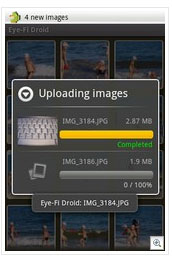
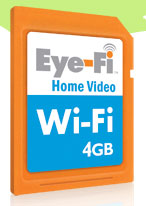
<p>What an Eye-Fi card you ask? Well, it’s a standard size SD card with 4GB of memory that you put in your camera. It also has a built-in Wi-Fi transmitter that connects to your computer and uploads your photos automatically. All you have to do is turn on your camera, it connects, and starts uploading your photos seamlessly. You can connect to 32 different networks.</p>

<p>Eye-Fi will also upload your photos to any of the popular photo storage services online such as Flickr and Picasa. You can control the photos you want to share and with whom. You can even upload to your Facebook account and automatically share photos with friends. By the way, it sends both photos and videos so that you can upload to YouTube as well.</p>

<p>But, that’s not all that Eye-Fi will do for you. It also geo-tags each photo before uploading it. It doesn’t work with GPS but rather with cell phone tower triangulation. So, if you are in a poor cell-phone reception area, your geo-tags may not work too well. But so far, it has been an incredible tool that can save hours of manual labor.</p>

<p>Normally, Eye-Fi charges an extra $15 a year for the geo-tagging service and $10 a year for the upload service to online storage facilities. However, this is all free with Google’s amazing offer.  These services will continue to be free as long as you maintain your minimum 200 GB storage agreement with Google.</p>

<p>All you need to take advantage of this offer is a Picasa account and an SDHC compliant camera. If you’re not sure, take a look at the list of compatible cameras.  If your camera uses an SD card, it will probably work with Eye-Fi.</p>

<p><img src="http://www.pencomputing.com/images/picasa_2.jpg" align="right" hspace="8">There are many different Eye-Fi cards available that range from $49.95-$149.95 and from 2 GB to 8 GB that you can buy in retail outlets such as WalMart, but you won’t get the deal offered in the Google Picasa storage bundle. To secure your free Eye-Fi card, go to http://www.eye.fi/google.</p>
<p>Note that the card you will receive is the 4 GB Home Video version. It may take a couple of weeks for it to arrive in the mail, so you have to be patient.</p>

<p>Not surprisingly, as Android phones are a Google enterprise, there is a free application that allows you to upload photos from your camera to your Android phone.  The app is called Eye-Fi Droid. Learn more about it at the developer’s Website: http://eyefidroid.leshak.com where there’s a video of the upload process in action.</p>

<p>I highly recommend the Google Picasa/Eye-Fi bundle. It’s an amazing bargain, a real no-brainer. But you should take advantage of it ASAP, as it’s a limited time offer.</p>]]>

</content>
</entry>
<entry>
<title>Google Mobile App        </title>
<link rel="alternate" type="text/html" href="http://www.pencomputing.com/mt/archives/2009/04/google_mobile_a.html" />
<modified>2009-04-24T20:07:21Z</modified>
<issued>2009-04-24T20:05:39Z</issued>
<id>tag:www.pencomputing.com,2009:/mt/8.298</id>
<created>2009-04-24T20:05:39Z</created>
<summary type="text/plain">I never cease to marvel at the Google’s prolific development of new applications. The latest one to come to my attention is simply called Google Mobile App. It is a plugin that can be placed on your Today Screen for...</summary>
<author>
<name>conradb212</name>

<email>cb@pencomputing.com</email>
</author>

<content type="text/html" mode="escaped" xml:lang="en" xml:base="http://www.pencomputing.com/mt/">
<![CDATA[<p>I never cease to marvel at the Google’s prolific development of new applications. The latest one to come to my attention is simply called Google Mobile App. It is a plugin that can be placed on your Today Screen for easy access or invoked from an icon in your Programs menu. Alternatively, you can program it to run from a hardware button.<br />
 <br />
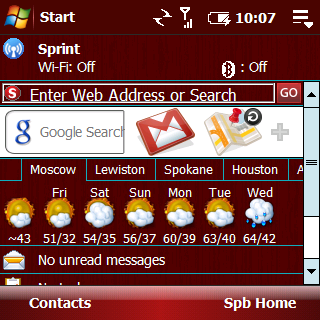
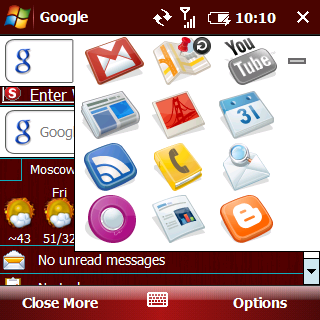
<img src="http://www.ruggedpcreview.com/images/google_mobile2.png" align="left" hspace="9">Not surprisingly, it has a text input box for Google searches as well as two icons on the main panel bar. I suspect a larger screen or landscape screen would reveal more icons on the panel, but this is how it appears on my Treo Pro square screen. The two icons are for Gmail and Google Maps. Tapping on the plus symbol brings up a new screen with more icons.<br />
 <br />
The popup screen has an array of 12 icons that will give you access to many of Google’s  popular applications such as Gmail, Maps, YouTube, News, Picassa, Calendar, Reader, 411, SMS, Orkut, Docs, and Blogger.<br />
 <br />
In case you are not familiar with all of these great services, let’s review them briefly so you will appreciate the usefulness of this nifty little application making them so easily accessible.<br />
 <br />
<b>Google Search</b>: the most popular search engine on the Internet. The nice thing about this search box is that you don’t have to wait to pull up a browser to initiate a query.<br />
 <br />
<b>Google Maps</b>: a great free mapping program that will find and call your favorite pizza parlor or give you turn by turn directions to it. If connected to GPS, it will track your progress on a map.<br />
 <br />
<b>YouTube</b>: Acquired by Google, YouTube is the most popular video posting service on the Web.<br />
 <br />
<b>News</b>: a nice news aggregator that compiles headlines from over 4500 English-language news sources worldwide and groups similar stories according to your interests and specifications—kinda like building your own customized newspaper<br />
 <br />
<img src="http://www.ruggedpcreview.com/images/google_mobile1.png" align="left" hspace="9"<b>Picasa</b>: This versatile photo application allows you to organize, edit, and turn your photos into movies (if you wish) and post them online.</p>

<p><b>Calendar</b>: represents an online calendar most useful for collaborative synchronization of events and appointments that can be accessed and edited by specified others.<br />
 <br />
<b>Reader</b>: an application that lets you get and organize the latest news and updates from your favorite sites and share it with others via email or blog.<br />
 <br />
<b>411</b>: tired of paying up to two bucks for calling your phone company to get a phone listing? Use 411 for free.<br />
 <br />
<b>Docs</b>: Everyone who engages in collaborative writing projects should use this great application so that all participants are all on the same page at all times. It’s a great way to share documents or publish them online. It accepts Word, Excel, and PowerPoint files.<br />
 <br />
<b>SMS</b>: the greatest and quickest instant access to information from weather to sports scores, from measurements to definitions, from finding businesses to movies and theaters, from postal codes to stock quotes, from directions to flight schedules, from Q&A to area codes and more. Just text 466453 (GOOGLE) to a set of keywords found here: http://www.google.ca/mobile/sms/index.html<br />
Orkut: yet another social networking site that has not really taken off in the U.S. but most popular in Brazil for some reason—named after a Google employee Orkut Byuykkokten<br />
 <br />
<b>Blogger</b>: allows you to post photos and text directly to your Blogger- built blog sites from your mobile phone.<br />
 <br />
<b>Conclusion</b><br />
 <br />
Clearly, the functionality of this application is a boon to mobile efficiency, and you would be well advised to make it part of your toolkit. The good news is that it is totally free, as are all the applications it connects too. You must have a Google account in some cases to enjoy the bounty, but that’s free too.<br />
 <br />
<img src="http://www.ruggedpcreview.com/images/google_mobile3.png" align="left" hspace="9"Sign up for a Google account, if you don’t have one, here:  http://www.google.com/accounts.<br />
Download Google Mobile here: http://tinyurl.com/epfz3. There is a version for almost any mobile platform, even iPhone. You can get it on your phone over the air here: http://tinyurl.com/clmz64. Or, visit m.google.com on your phone’s browser.<br />

 <br />
I’m surprised that other popular Google applications such as Talk, iGoogle, and Notebook were not included. Perhaps they will be in future iterations. What would be really nice is if you could add or subtract your favorite applications.</p>]]>

</content>
</entry>
<entry>
<title>iPhone eBook Readers Still Stone Tablets</title>
<link rel="alternate" type="text/html" href="http://www.pencomputing.com/mt/archives/2009/03/iphone_ebook_re.html" />
<modified>2009-03-06T16:43:49Z</modified>
<issued>2009-03-06T16:42:34Z</issued>
<id>tag:www.pencomputing.com,2009:/mt/8.288</id>
<created>2009-03-06T16:42:34Z</created>
<summary type="text/plain">Zealot’s interesting iBook article Published on the Mobility Site compelled me to make a few observations about iPhone eBook readers. While I am pleased that eBooks are a growing and popular download item, I am disappointed with the iPhone platform....</summary>
<author>
<name>conradb212</name>

<email>cb@pencomputing.com</email>
</author>

<content type="text/html" mode="escaped" xml:lang="en" xml:base="http://www.pencomputing.com/mt/">
<![CDATA[<p>Zealot’s interesting iBook article Published on the Mobility Site compelled me to make a few observations about iPhone eBook readers. While I am pleased that eBooks are a growing and popular download item, I am disappointed with the iPhone platform. I have been a long-time champion of eBooks and have developed some strict requirements for a decent eBook reader. I am afraid that there simply is not a decent eBook reader for iPhone yet. Sadly, iPhone users do not even seem to know the difference. It appears that as long as you can turn the page with your nose-mining finger, that’s all that’s required. The Earth’s flat, and that’s that.</p>

<p>By all measures, Stanza is by far the best, preferred, and most downloaded eBook reader for iPhone and iPod. It receives good marks for being able to handle a wide variety of eBook platforms and even convert them for iPhone consumption. But, it apparently loses formatting in some cases. It has a nice interface for finger-friendly page turning, but it lacks an autoscroll feature for faster and lazier readers. It also earns points for its ability to change fonts, font sizes, font colors and page background colors. This all contributes positively to the eBook reading experience.</p>

<p>However, the eBook reading experience can be so much more powerful. What turned me on to eBooks and won me over instantly way back before the turn of the century was being able to tap on a word in any language and having the definition pop up on the screen. That was way cool and converted me to eBook reading and abandoning treebooks forever. Can’t do that on Stanza on an iPhone. What a pity. But then, maybe iPhone readers have such extensive vocabularies and are such polyglots that this feature is simply not necessary and is beneath their dignity.</p>

<p>Other features lacking in even the best iPhone reader as exemplified in Stanza include the ability to annotate text, index the annotations, and search them. Speaking of searching, apparently Stanza will only allow searching within chapters, not globally. </p>

<p>What about the ability to make drawings, sketches, and handwritten notes in your choice of colors on pages without destroying the book as you would with a treebook. Nope, not on an iBook. </p>

<p>What about highlighting text in your choice of color coding? No can do on an iPhone.</p>

<p>What if you want to copy and paste text from an eBook into another application for research purposes? Sorry, iPhone is anti-academic on this issue. Wouldn’t it be nice too if it automatically referenced the source? Actually, as I understand it, you can’t copy and paste anything on an iPhone, so it’s not surprising that this feature is lacking in eBooks as well.</p>

<p>Another problem is that there is a lack of up-to-date material on the iTunes site. You cannot download any New York Times best sellers for example. None of the popular authors are represented. Clearly, it must be a matter of digital rights issues that Apple has not yet resolved. Of course the same thing applies to audiobooks and the lack thereof for this platform.</p>

<p>It is sad that iPhone and iPod users cannot take advantage of the marvelous free eBook and audiobook download programs available at almost all public libraries these days because of DRM issues and incompatible formats.</p>

<p>Ebook reading remains a far superior experience on Windows Mobile devices. However, I am pleased that iPhone people are discovering eBooks. Perhaps when they learn the difference they will demand that developers bring readers up to speed. EBook reading and readers will benefit greatly, and that is what matters. Maybe, if the demand justifies it, there will even be some decent material available to read on iPhones that still has a copyright.</p>]]>

</content>
</entry>
<entry>
<title>Texting with Tatango </title>
<link rel="alternate" type="text/html" href="http://www.pencomputing.com/mt/archives/2009/02/texting_with_ta.html" />
<modified>2009-02-27T00:12:28Z</modified>
<issued>2009-02-27T00:06:36Z</issued>
<id>tag:www.pencomputing.com,2009:/mt/8.287</id>
<created>2009-02-27T00:06:36Z</created>
<summary type="text/plain">Recently I published an article in which I maintained that text message or SMS marketing is the future of advertising. I even went so far as to declare that there has never been a more powerful marketing tool ever invented....</summary>
<author>
<name>conradb212</name>

<email>cb@pencomputing.com</email>
</author>

<content type="text/html" mode="escaped" xml:lang="en" xml:base="http://www.pencomputing.com/mt/">
<![CDATA[<p><img src="http://www.pencomputing.com/images/tatango.png" align="left" hspace="8">Recently I published an article in which I maintained that text message or SMS marketing is the future of advertising. I even went so far as to declare that there has never been a more powerful marketing tool ever invented.</p>

<p>Today let me share with you a great way to get started in mobile marketing or just keeping in touch with a group through texting. Allow me to introduce you to Tatango.</p>

<p>Tatango was invented by some fraternity brothers who needed a way to keep the brethren apprised of meetings and activities which was always a daunting task. They came up with an application that allowed them to send out a text message to all the guys’ mobile phones simultaneously, and it worked like a charm.</p>

<p>Now, a few years later, the system has been funded by venture capitalists, and it is available for public consumption. The good news is that it is free, so it makes a great way to get started with the power of texting.</p>

<p>It can be used simply as a group communication tool for a soccer team or a church group. It can also be used my MLM junkies wanting to keep in touch with their downline. It can also be used as a recruiting tool by allowing people to text into the system requesting to be included on the distribution list.</p>

<p>There are two elements to SMS or short message service communication. First is a short code consisting usually of five digits instead of ten, making it easier for users. The second aspect is a keyword used for identifying the group and the appropriate response for the server to send back. Accordingly, suppose you were a realtor and you had a texting panel on your for sale sign. It would say something like “text mls12234 to 34567.” This instructs a prospective client to send a message to 34567 with the code mlm12234. This tells the computer to include this customer in the database and to return information about the particular property in question.<br />
The beauty of SMS marketing is that that customer must request to be sent information on an opt-in basis. Recipients may opt-out at any time by merely texting the word STOP. They are automatically removed from the database. Ideally this is how it works and is mandated by the FCC. However, there have been instances of abuse by foreign servers over which the FCC has no authority. There will always be some people who abuse the system.</p>

<p>There are four ways for people to join your group. You can send an email invitation to an individual or list with instructions. You can send a text message to a mobile phone number with instructions. Tatango offers a widget that can be embedded in social networking sites such as MySpace, Twitter, Facebook, and Linkedin, a blog or Website that enables people to sign up for your group. This is a terrific tool for expanding your marketing list.</p>

<p>As I mentioned, this is a free service. However, the free service is supported by advertising. This means that each message contains a short ad from a sponsor. This may be tolerable for members of a team or a social group looking for an inexpensive but efficient means of communication. But it would hardly do for a professional association or for business marketing efforts.<br />
Accordingly, Tatango has different levels of service ranging in price for varying numbers of ad free messages ranging from 200 for $9.95 to 3000 for $99.95.</p>

<p>You receive from one to 5 keywords depending on account level. Keywords may be used to identify different groups or different marketing campaigns. For instance, suppose you owned a pizza restaurant, and you wanted to identify vegetarians from meat lovers so that you could segment future marketing strategies. You could offer different specials with keywords identifying each group.<br />
While Tatango is a great way to get started with texting for a group for free, I would not advise using the free service for a business. You will turn your customers off with the ads in the messages. If you want to use this service for your business, you would certainly use a paid plan that is ad free. The only ads you want in a message are yours.</p>

<p>Check out Tatango at <a href="http://www.tatango.com">www.tatango.com</a>. Get a free account to see how it works. See if Tatango’s paid services will suit your needs. Keep in mind that there are other, more sophisticated service providers available that you may wish to investigate before making a commitment to a sustained mobile marketing effort.</p>

<p>If would like to learn more about mobile marketing, please visit <a href="http://synergetics-sms.blogspot.com/">my SMS Blog</a>.</p>]]>

</content>
</entry>
<entry>
<title>Slingbox revisited</title>
<link rel="alternate" type="text/html" href="http://www.pencomputing.com/mt/archives/2009/01/slingbox_revisi.html" />
<modified>2009-01-30T05:04:52Z</modified>
<issued>2009-01-30T04:13:12Z</issued>
<id>tag:www.pencomputing.com,2009:/mt/8.285</id>
<created>2009-01-30T04:13:12Z</created>
<summary type="text/plain">As far as I’m concerned, Sling Media is a company that has rocked the world, at least my world. I’ve been a champion of Slingbox since the beginning in 2004. What will a Slingbox do for you? A Slingbox is...</summary>
<author>
<name>conradb212</name>

<email>cb@pencomputing.com</email>
</author>

<content type="text/html" mode="escaped" xml:lang="en" xml:base="http://www.pencomputing.com/mt/">
<![CDATA[<p>As far as I’m concerned, Sling Media is a company that has rocked the world, at least my world. I’ve been a champion of Slingbox since the beginning in 2004.</p>

<p>What will a Slingbox do for you?</p>

<p>A Slingbox is a small, sleek unit that connects directly to your TV or DVR. It makes it possible to watch live or recorded TV on your computer, laptop, or mobile phone from home or anywhere in the world. Anything you can do with your remote control at home, you can do with Slingbox on your computer remotely. You can record, playback, and send clips via email.</p>

<p>Technical Support</p>

<p><img src="http://www.pencomputing.com/images/news_slingbox.jpg" align="right">When purchasing a new product, especially when you are just getting starting and setting it up, it is important to know that there is good technical support available. I am happy to report that Sling Media’s customer support is superb. Phone support is available from 7AM to 7PM PST, seven days a week. Online support is available through email and live chat. It doesn’t get much better than that. I have found technicians to be knowledgeable and helpful.</p>
<p>Sling Media Products</p>

<p>My first Slingbox was a plain vanilla AV that worked without flaw for at six years, and then it developed some kind of a connection problem, but it was time to upgrade anyway. I have recently acquired a more powerful HD Pro capable of transmitting HD data and a much better resolution picture. It goes for $299.99. HD Pro lets you control and watch your home TV on multiple devices.</p>

<p>The Slingbox Solo only costs $179.99 and will stream a single standard or high-definition video input to a remote device.</p>

<p>The SlingCatcher is a digital video data amalgamator that brings entertainment to your TV set. With SlingCatcher, you can display data from a Slingbox, your computer, or any other data source available, including the Internet or from a storage device. This universal media player costs $199.99. You might think of it as a reverse Slingbox that displays video on your TV instead of displaying TV video on your remote devices. One drawback for the moment is that it will not sling HD content. It doesn’t work on MACs either. </p>

<p>If your router is in a different location than your TV and DVR, you don’t have to run a hardwire connection. Let SlingLink Turbo come to the rescue. Turbo boxes plug into ordinary power outlets in your home and use the wiring in your house to transmit data from your Slingbox to your router. All you have to do is plug Ethernet cables in from Turbo box to the Slingbox and from the Turbo box to the router.  SlingLinks come in single port ($79.95) and four-port models ($49.95).</p>

<p>Software</p>

<p>The most recent version of Slingplayer software gives you an onscreen remote control that looks just the one at home so there is no learning curve. You can also display a complete TV lineup from your TV source complete with program descriptions.  Slingplayer software for desktops and laptops is free as are updates. Display of remote and guide data is optional and you can select placement options for where it appears on the screen.</p>

<p>Updates for SlingLink and and SlingCatcher are available as free downloads.</p>

<p>Slingplayer software for mobile devices is not free and costs $29.95. You can try it free for 30 days. After that, a registration code is required. Slingplayer for mobile devices is already available for Windows Mobile, Symbian, and even Blackberry. It will soon be on iPhones as well.</p>

<p>Observations</p>

<p>I cannot even imagine leaving home without Slingplayer software installed on my mobile phone and laptop. The great thing about it is that it really works, even with HD TV, and there is no monthly fee.</p>

<p>News Flash: Dish Network recently acquired Sling Media. It will be interesting to see how this relationship unfolds. I first learned of this acquisition by the curious appearance of a four minute recording on my DVR. It was a nice little commercial for Slingbox at the end of which viewers learn that Dish had purchased Sling Media. It reminded me of AT&T spamming their customers with unsolicited text messages. I wonder if this is a portend of things to come with cable and satellite companies pounding their customers with SPAM. Shame on Dish.</p>

<p>However, we shall soon see the first favorable outcome of this new relationship. Echostar, the parent company of Dish, has already combined Slingbox technology with its new Echostar 922 DVR with 1 terabyte of expandable storage. This amazing device that won best of show in CES will be available soon.</p>]]>

</content>
</entry>
<entry>
<title>Twitter away your time for fun and profit</title>
<link rel="alternate" type="text/html" href="http://www.pencomputing.com/mt/archives/2009/01/twitter_away_yo.html" />
<modified>2009-01-06T18:49:47Z</modified>
<issued>2009-01-05T22:06:21Z</issued>
<id>tag:www.pencomputing.com,2009:/mt/8.279</id>
<created>2009-01-05T22:06:21Z</created>
<summary type="text/plain">When I first heard of Twitter, I was amazed and amused that it was spreading like wildfire in a frenzy of popularity. It’s all based on a message limited to 140 characters that basically tells people what you are doing...</summary>
<author>
<name>conradb212</name>

<email>cb@pencomputing.com</email>
</author>

<content type="text/html" mode="escaped" xml:lang="en" xml:base="http://www.pencomputing.com/mt/">
<![CDATA[<p>When I first heard of Twitter, I was amazed and amused that it was spreading like wildfire in a frenzy of popularity. It’s all based on a message limited to 140 characters that basically tells people what you are doing at the moment. My first reaction was, who cares? But apparently people do, and folks are not bashful about sharing what they are up to with others. So, why not use this proclivity to visit for word of mouth advertising or for spreading the word for a worthy cause? Your posted messages, by the way, are known as Tweets.</p>

<p>Twitter is a social networking application that is also a mini-blogging service, which limits posts to 140 characters, even smaller than a 160 character text message.</p>

<p>As long as you are tweeting away telling others about what you are doing, why not tell them about your business and use this system to bring in some bling?</p>

<p>The first thing to do is to sign up for an account. It’s free. Go to <a href="http://www.twitter.com" target="_blank">www.twitter.com</a>. Watch the video for a nice overview of how it works. Then signup by entering your name or email address and password. That’s all there is to it, and you can began to Twitter and Tweet by following your friends and making new ones. You’ll be surprised at how fast you will start attracting followers.</p>

<p>Be sure to fill out your profile and post a picture of yourself. Try to make your profile compelling. If you are promoting a business or a cause, you can add a one line bio and a URL for followers to view.</p>

<p>If you are away from you computer and still want to Twitter, you can do it on your mobile phone; it’s easy to set up. Sign in to your account. Click on Settings at the top of the page. Then click Devices where you will enter your mobile number. After verification, you will receive text message instructions on how to use the system from your mobile device by texting your Tweets to the short code 40404.  </p>

<p>There’s even a mobile Website set up for Twitter. Check it out at <a href="http://www.m.twitter.com" target="_blank">www.m.twitter.com</a>. </p>

<p>Now, here’s a little advice on how to go about marketing with Twitter. First of all, don’t abuse the system by indiscriminately spamming your followers. In fact, I would strongly advise against any sales message whatsoever in your Tweets. Simply offer worthwhile information. I suggest that you write a blog article, give the title, and a link to your blog or Website in your Tweet.</p>

<p>Some links may be overly long for the 140 character format. To truncate them and save space, try TinyURL at <a href="http://www.tinyurl.com" target="_blank">www.tinyurl.com</a>. Here you can type in the long form and receive a much reduced form that you can include in your Tweet. You can also put a TinyURL button on your browser. Once the button is in place, all you have to do is click it, and TinyURL will create a short URL for the currently viewed page.</p>

<p>Another thing you can do is put a link on your blog or Website asking people to follow you on Twitter in return for following them to create more followers.</p>

<p>Don’t overlook the tools that come with Twitter for gathering followers. Click on Find People at the top of the page. Here you will be able to search for individuals by username, first, or lastname who are already Twitter members.</p>

<p>Click on Invite from Other Networks, insert your email address, and Twitter will search your contact list for current Twitter members on your list. A list of contacts is also generated of people who do not yet have a Twitter account. You can have Twitter send an email inviting them to get an account and follow you. The only problem with this is that it only applies to free email accounts such a gmail, yahoo, hotmail, etc.</p>

<p>However, you can click on Invite by Email, and a box will appear that allows you to enter a comma separated list of contacts to whom Twitter will send an email message inviting them to sign up and follow you and tells them a little bit about Twitter.</p>

<p>This is what the message looks like:</p>

<p>From: tshphd<br />
Subject: tshphd wants to keep up with you on Twitter<br />
 <br />
To find out more about Twitter, visit the link below:<br />
http://twitter.com/tshphd<br />
 <br />
Thanks,<br />
-The Twitter Team<br />
 <br />
About Twitter<br />
 <br />
Twitter is a unique approach to communication and networking based on the simple concept of status. What are you doing? What are your friends doing—right now? With Twitter, you may answer this question over SMS or the Web and the responses are shared between contacts.<br />
 <br />
Remember too that you can sign up for RSS feeds in Twitter so that you can follow others and they can follow you, which represents an additional marketing opportunity.</p>

<p>Yet another way to spread the word is that you can share your Twitter Tweets on your Facebook account so that all your Facebook friends can see what you’re up to as well.</p>

<p>Finally, go to the bottom of a Twitter page and click on API where you will find some Widgets that allow you to use Twitter even more creatively. If you want more, there are additional Widgets on the <a href="ttp://twitter.pbwiki.com/Apps" target="_blank">Twitter Fan Wiki</a>. Don’t forget to check out the desktop applications for Windows at the bottom of the page. You are invited to write your own widgets using API. The list is impressive and so is the array of creativity, which clearly demonstrates the enthusiasm for Twitter. Apps are available for Windows, Mac, Linux, iPhone, Android,WM, and Blackberry environments.</p>

<p>In conclusion, Tweeting is a great way to twitter away your time profitably by using this social networking phenomenon as a powerful marketing tool.</p>

<p>Now, if you want to follow me, please go to www.twitter.com/tshphd, click on Follow, and send me a Tweet. I’d love to hear from you; maybe we can sell each other something. But, I have to warn you that I don’t do MLM. What I’m looking for is a residual income of about $20K a month that requires that I don’t have to do any work.</p>]]>

</content>
</entry>
<entry>
<title>Stocking Stuffers 2008</title>
<link rel="alternate" type="text/html" href="http://www.pencomputing.com/mt/archives/2008/12/stocking_stuffe_1.html" />
<modified>2008-12-22T00:36:09Z</modified>
<issued>2008-12-22T00:14:04Z</issued>
<id>tag:www.pencomputing.com,2008:/mt/8.277</id>
<created>2008-12-22T00:14:04Z</created>
<summary type="text/plain">For the past several years, I have offered suggestions for stocking stuffers that you can use for your digitally addicted friends. Or, if you are so afflicted yourself, you may wish to drop a few hints based on the ideas...</summary>
<author>
<name>conradb212</name>

<email>cb@pencomputing.com</email>
</author>

<content type="text/html" mode="escaped" xml:lang="en" xml:base="http://www.pencomputing.com/mt/">
<![CDATA[<p>For the past several years, I have offered suggestions for stocking stuffers that you can use for your digitally addicted friends. Or, if you are so afflicted yourself, you may wish to drop a few hints based on the ideas herein.</p>

<p>How about a new phone? There are so many choices out there that it’s difficult to know where to begin. First of all, if you are productivity oriented, and need to create, edit, and process documents in Word, Excel, PowerPoint, and databases, your only real choice is a Windows Mobile device. Next you must consider whether you want a touch or non-touch screen. I recommend a touch screen. If you just want a phone with consumer features instead of a productivity device, you would probably be happy with an iPhone or Blackberry. </p>

<p>Within the Windows Mobile arena, there are dozens of choices. You certainly cannot go wrong with anything produced by HTC. You may also want to consider a new kid in the U.S. market, MWg. Give the snazzy Zinc II a looksee. You might also want to check out the Palm Treo 800w, which snuggles in your hand with lots of nice features.</p>

<p>For peripherals, there are some great  headphones and headsets. My favorites are made by Jabra (<a href="http://www.jabra.com" target="_blank">www.jabra.com</a>), but there are certainly lots of others to choose from. You may want a headset that fits over your ear for use with your phone, but try to get one that also plays music. Headsets usually hurt my ear after a while. I prefer Bluetooth stereo headphones that fit over both ears. An incoming call stops the music and allows you to talk on the phone with a build-in microphone. A push of a button, and you can resume the music.</p>

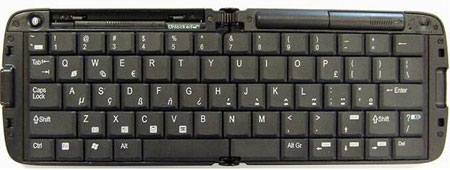
<p>Another welcome peripheral is an external Bluetooth keyboard. With the demise of the iGo keyboard, which was always my first choice, the playing field is narrowed. Some phone manufacturers offer their own species specific keyboards, but it may be better to get a more universal one such as the one produced by Freedom. It has five rows of keys, folds in half for portability, comes with a removable device stand, and easily connects to most Bluetooth devices for about $100. I would avoid the fabric rollup keyboards. I haven’t had good luck with them, and they lack the tactile quality of a real keyboard. I would also eschew the infrared projected keyboards. While they have a certain wow factor, they are weird to type on.</p>

<p><img src="http://www.pencomputing.com/images/ss08_image001.jpg"> </p>

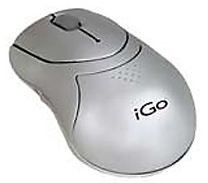
<p>If you have a Bluetooth keyboard, you may also wish to obtain a Bluetooth wireless mouse for your pocket pal. It may sound silly, but it’s quite an amazing experience to use a mouse to navigate around your little mobile screen. You will be surprised at how much it will increase your productivity. It’s also great for game playing. While iGo may have given up trying to create drivers for the keyboard, it still makes the greatest little BT mouse in the house. Get one at www.igo.com for $79.95. It may seem a superfluous novelty, but it’s truly a productivity booster.</p>

<p><img src="http://www.pencomputing.com/images/ss08_image002.jpg">  </p>

<p>Many phones come with built-in GPS these days. The two I mentioned above both have it. But, if you want a dedicated GPS for navigating in your vehicles, I recommend the Mio line, which you can check out at www.mio.com, but there is no end of choices. I suggest that you buy one with Bluetooth capability so that you can link it to your phone and use it as a hands free device while you’re driving for safety sake. Many GPS models are multi-functional allowing you to view photos and videos as well as play music with an expansion card. You could even listen to an audiobook while you drive.</p>

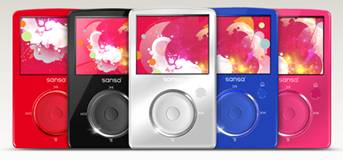
<p>Speaking of music and audiobooks suggests a nice little MP3 player. If you are interested in Audiobooks, be sure to get one that is capable of bookmarking. Two I recommend are made by SanDisk, the Sansa Clip and the Sansa Fuze. Both have 8 GB capacities, but the Fuze has a micro SD expansion slot for even more memory. The Fuze displays pictures and video while the Clip doesn’t. Both play music, have FM radios, and digital recorders. Check them out at (<a href="http://www.sandisk.com" target="_blank">www.sandisk.com</a>, but they are readily available in retail stores such as WalMart.</p>

<p><img src="http://www.pencomputing.com/images/ss08_image004.jpg"> <br />
 <br />
Prices range from $39 to $119 depending on model and capacity.</p>

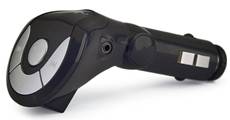
<p>If your car is not set up for you to connect your MP3 or phone to your radio speaker system, you may want to consider an FM modulator. You simply plug the device into the cigarette lighter socket and then tune it to an empty FM station. Plug your output device into it and it will broadcast an FM signal like a little radio station. Your car radio will pick it up and play it over the speakers. It works great unless you have a ton of FM stations in your area. Try to find one that has an optical display. I recommend the VR brand that comes in various models and colors. You can buy them at most electronics stores. They are even available at WalMart for around $30.</p>

<p><img src="http://www.pencomputing.com/images/ss08_image005.jpg">  </p>

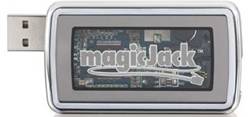
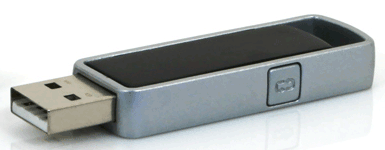
<p>Now here’s one that should be in every stocking if you want to save money on your phone bill. It’s none other than MagicJack, which is USB plug and play hardware about the size of a match box. You can plug it into any PC anywhere in the world and start making VoIP calls. It costs $39.95, which includes unlimited local and long distance calls in the U.S. and Canada for the first year. Thereafter, it’s $19.95 a year-- a year--not a month. Clearly, it’s the best deal going. You can plug any phone into it and make calls as you normally would. It works like a charm, and is clear as a bell. Check it out at www.magicjack.com. It works on PCs, MAC Intel machines, and will soon work on Unix boxes. Say goodbye to monthly phone bills.</p>

<p><img src="http://www.pencomputing.com/images/ss08_image006.jpg"> <br />
 <br />
If you’re looking for cases for your handheld devices, Proporta.com has got you covered at www.proporta.com where you will find a host of other peripherals. If you are looking for a new case, consider getting a universal one so that you don’t have to throw it out every time you get a new device. Proporta has a nice line of universal cases that come in three sizes.</p>

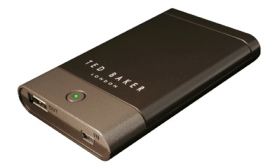
<p>One of my favorite accessories from Proporta is the portable recharger that can save your bacon on the road. There are several models available. Don’t leave home without one. Another cool peripheral is the keychain GPS receiver.</p>

<p><img src="http://www.pencomputing.com/images/ss08_image007.png"> </p>

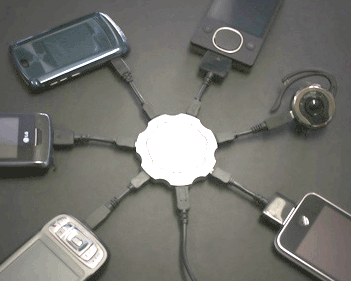
<p>Speaking of chargers, I love my CallPod sextopod charger, and I think you would too, for it can charge six of your devices at the same time. It costs $39.95. Extra adapters are $9.95 each.</p>

<p><img src="http://www.pencomputing.com/images/ss08_image009.png"> </p>

<p>Spares are a good thing to have. Ask Santa for some extra styli, batteries, and expansion cards.</p>

<p>I won’t bother to get into software because that’s all downloadable and difficult to stuff in a stocking. Unfortunately, I could not find any online software vendor that offers a gift certificate. How strange.</p>

<p>If you haven’t tried any of SlingMedia’s products, ask Santa for a Slingbox or one of its cousins. With this ingenious device, you can broadcast your home TV live or recorded over the Internet and watch it anywhere from another PC, a laptop, or Pocket PC. Prices vary from $179 to $299 depending on the box you buy. You can download the software free for your desktop and laptop, but, for some inexplicable reason,  you have to pay $24.95 for the Pocket PC version. However, it’s well worth it. Imagine being able to control and watch your home TV live or recorded on your phone. It’s now possible to capture snips and email them.</p>

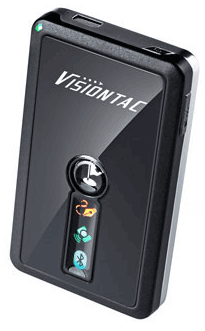
<p>If you enjoy photography, you probably have the problem of identifying photos and where you took tem when you get back home. A VisionTac VGPS-9000 GPS logger will solve this problem for you. All you have to do is sync the clock on your camera with this tiny, portable GPS unit. It will record your entire trip. When you get home, load the photos into the log file, and it will sync your photos and plot them on a map. While there are many similar logging devices, this is the only one that allows marking waypoints and voice recordings so that you can describe a photo or location, and it will be keyed to a map location as well. The only problem is that only works in metric units. Go to www.visontac.com to check it out. It also serve as a Bluetooth GPS receiver for your phone. You can program it to sound an alarm if you go over the speed limit, so it can keep you from getting tickets as well. I should have been using it a couple of weeks again when I got nailed by a cop for going very slightly over the speed limit. It also has a micro SD expansion slot. I saw one on Amazon.com for $110.</p>

<p><img src="http://www.pencomputing.com/images/ss08_image010.png"> <br />
 <br />
Here’s another great little stocking stuffer—another product from CallPod called the Drone. Just plug it into the USB port of your PC or MAC computer. This little plug and player will automatically find and pair with your Bluetooth headset or stereo headphones. It supports all VoIP platforms for BT transmission and auto switches between incoming calls and music. It controls music players such as iTunes and Windows Media Player. Drone has an extended range of over 100 feet. I’d call this little guy a must-have for  $49.95 from (<a href="http://www.callpod.com" target="_blank">www.callpod.com</a>.</p>

<p><img src="http://www.pencomputing.com/images/ss08_image011.png"> <br />
 <br />
There are many portable speaker systems available for MP3 players, many are species specific so that if you get a new player, you have to get new speakers. One that I like because it is pretty much universal takes advantage of flat panel speaker NXT technology with a superb sound for a portable system. It’s available from Logitech and major retailers. It runs on four AA batteries or AC and has a 3.5 mm plug with a 2.5 mm adapter. Unfortunately, it won’t work on devices with non-standard goofy connectors. So don’t buy devices with goofy non-standard connectors. I’ve seen them priced as high as $69.95, but I found them for only $29.95 at (<a href="http://www.pacificgeek.com" target="_blank">www.pacificgeek.com</a>).</p>

<p>I suppose you may also want to consider a Satellite radio player for your car/office/home. However, I a so upset by the merger of XM and Sirius and the uneven results, that I really don’t want to talk about it much. So, I will leave you up to your own devices there so to speak.</p>

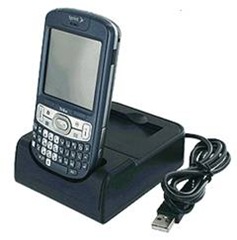
<p>If your Windows Mobile device didn’t come with a cradle, you may want Santa to bring you one. They are pretty much proprietary, so you will have to check it out yourself, but I mention it because they make life easier when synching. Try to get one that will charge an extra battery.</p>

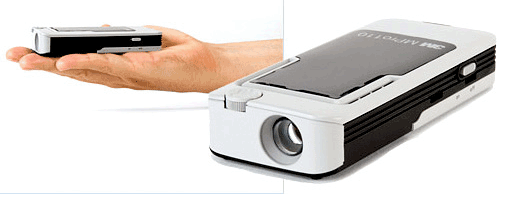
<p>It’s probably about time to wrap this up because I still have some Christmas shopping to do and packages to wrap. My last suggestion is a mini-projector. The one I will recommend for now is the tiny 3M MPro 110 that fits in the palm of your hand, hooks up to laptops, cell phones, and other digital output devices. It will project a 50 inch image in a dark room and a 10 inch image in a brightly lit room. At just $360, it is a great portable projector solution for business presentations. It also makes a very affordable large screen TV. Shop around for a better price. Check them out at www.3m.com. I suggest you use it in conjunction with Slingbox to play live and recorded TV. Be on the lookout for more of these devices. I saw several prototypes at CES, and more are poised to hit the market soon.</p>

<p><img src="http://www.pencomputing.com/images/ss08_image012.png"> <br />
 <br />
May your stockings brim abundantly; a merry holiday season to all, and to all a cheery goodnight!</p>]]>

</content>
</entry>
<entry>
<title>Treo 80w cradle/battery</title>
<link rel="alternate" type="text/html" href="http://www.pencomputing.com/mt/archives/2008/12/treo_80w_cradle.html" />
<modified>2008-12-18T00:46:46Z</modified>
<issued>2008-12-18T00:43:52Z</issued>
<id>tag:www.pencomputing.com,2008:/mt/8.274</id>
<created>2008-12-18T00:43:52Z</created>
<summary type="text/plain">When I reviewed the new Palm 800w a few months ago, I lamented the lack of accessories and the new, non-standard connector. More recently I have reviewed several handheld screen control applications as an alternative to cradles, which no longer...</summary>
<author>
<name>conradb212</name>

<email>cb@pencomputing.com</email>
</author>

<content type="text/html" mode="escaped" xml:lang="en" xml:base="http://www.pencomputing.com/mt/">
<![CDATA[<p>When I reviewed the new Palm 800w a few months ago, I lamented the lack of accessories and the new, non-standard connector. More recently I have reviewed several handheld screen control applications as an alternative to cradles, which no longer seem to come in the box as in the days of old. Well, Palm now has a nice cradle available for the 800w, and it’s nice to have a cradle again.</p>

<p><img src="http://www.pencomputing.com/images/treo_cradle.jpg" align="left">One of the things that bothered me about the new connector is that I could no longer use any of my old Palm accessories I had accumulated for the 700w series. It meant that I would have to get new ones, which is a bother and an expense.</p>
<p>However, I must say that the new cradle is an improvement over the old one. The old one required a power cord as well as a USB cable. The new one uses only a USB cable, which will sync and charge at the same time—no power cord required.</p>

<p>The new cradle also accommodates charging a second battery while simultaneously syncing and charging your Treo 800w. The previous cradle required that you disconnect the PDA, open a door, and insert the battery for charging. This was an inconvenience because it would break your sync link, and you would have to start all over again.</p>

<p>The cradle can be yours for $24.95, and I recommend it highly for its convenience and utility. To get yours, go to the Mobihand site at http://tinyurl.com/6nstu3.</p>

<p>What could be worse than running out of juice when on the road or away from a charger? Accordingly, it is always wise to carry a spare battery for emergencies. While you are visiting the Mobihand site, throw an extra battery in the shopping cart. You will be glad you did, and the spare battery compartment on the cradle makes it convenient to keep it charged for emergencies.</p>

<p>A 1350 mAh extended life battery for your 800w will set you back $39.95, but it’s a worthwhile investment I am certain you will never regret.</p>]]>

</content>
</entry>
<entry>
<title>SBSH Pocket Weather 2.1--just released</title>
<link rel="alternate" type="text/html" href="http://www.pencomputing.com/mt/archives/2008/11/shsh_pocket_wea.html" />
<modified>2008-11-24T20:19:32Z</modified>
<issued>2008-11-24T19:56:58Z</issued>
<id>tag:www.pencomputing.com,2008:/mt/8.272</id>
<created>2008-11-24T19:56:58Z</created>
<summary type="text/plain">There are many good Today Screen weather programs available these days. I have probably reviewed them all at one time or another. But, Pocket Weather is my favorite. I was disappointed recently when it would not install on a new...</summary>
<author>
<name>conradb212</name>

<email>cb@pencomputing.com</email>
</author>

<content type="text/html" mode="escaped" xml:lang="en" xml:base="http://www.pencomputing.com/mt/">
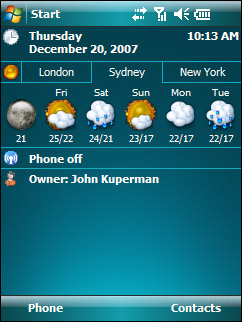
<![CDATA[<p>There are many good Today Screen weather programs available these days. I have probably reviewed them all at one time or another. But, Pocket Weather is my favorite. I was disappointed recently when it would not install on a new WM 6.1 unit no matter what I tried. But I was heartened when the new version worked on my Palm Treo WM 6.1 with a 320 x 320 screen.</p>

<p><img src="http://www.pencomputing.com/images/pocketweather21.png" align="right" hspace="6"Weather is certainly a central issue for most people. It can be a matter of life and death sometimes. It is always the first thing I look at when turn on my pocket pal in the morning, and I appreciate its being displayed prominently on my Today Screen. I also like being able to have immediate access to other cities where friends, relatives, and associates reside or cities where I travel. It’s nice to have forecasts and more detailed information should I wish it and weather alerts as well.</p>

<p>In my experience Pocket Weather has always had the most in-depth weather information, enough to please the most demanding meteorologist. For instance, you can view daily forecasts that cover visibility, humidity, dew point, sunrise/sunset times, weather maps, radar images, METAR feeds used by the aviation industry, and even earthquake tracking.</p>

<p>There are a variety of layouts for the display panel that vary the amount of data and its arrangement. You can set the measurement formats and even get wind velocity and direction. If you wish, you can create weather comparison charts for various locations. This is a new feature in the latest release. There are additional, free templates available for download from the SBSH Website.</p>

<p>Another new feature includes icons and skins, also available as free downloads. But the program already comes packed with many options.</p>

<p>What else is new in 2.1?<br />
<ul><br />
<li>D-pad navigation for one-handed control and easy access to the depths of the data<br />
<li>For those with touch screens and a finger fixation, you will be glad to know that you can also navigate with finger gestures. So see a YouTube demo, go here: http://www.youtube.com/watch?v=WmIGe33pjp8<br />
<li>New scripting system that allows designers/users to create custom display layouts. There is a manual on how to do it at  http://downloads.sbsh.net/products/pocketp...yout_Manual.pdf<br />
<li>A redesigned weather console now supports almost every size and shape. That’s why I was so delighted to have it available on my Palm square screen.<br />
<li>The weather console now support METAR current conditions with raw METAR/TAF data with optional comparative views.<br />
<li>A new set of icons designed by Juni is also available for download giving the application a new look and feel<br />
<li>The new skin images support PGN format as well as the older TGA files, but PNG files have a smaller footprint.<br />
<li>Ability to use multiple weather sources<br />
<li>And, for you lunatics, there’s even a moon phase view<br />
<li>For GPS enabled devices, PW will find locations near you, update, and report the local weather. This is a slick and unique feature, but it will drain the battery.<br />
<li>Now there is also a version available for WM non-touch screens.<br />
 </ul><br />
If you use SBSH’s Pocket Breeze, you will be pleased to know that Pocket Weather is now an integrated feature. Pocket Breeze is an application that allows you to manage your agenda from your Today Screen. The ability to access Pocket Weather from Pocket Breeze is a considerable convenience. You must have the latest Pocket Breeze 5.4 to take advantage of this option.</p>

<p> Obviously the power of any weather program is its weather data source. While Pocket Weather comes with a highly accurate source, it now allows users to acquire data from a variety of other sources as well. You can even download a weather source template editor from http://downloads.sbsh.net/products/pocketp....00_pctools.zip</p>

<p>If you are looking for a weather station in your pocket, you cannot do better than Pocket Weather. Download a free trail at www.sbsh.net or purchase it for just $14.95. Check with SBSH for the possibility of a $4.95 upgrade.</p>]]>

</content>
</entry>
<entry>
<title>SPB’s new keyboard</title>
<link rel="alternate" type="text/html" href="http://www.pencomputing.com/mt/archives/2008/11/spbs_new_keyboa.html" />
<modified>2008-11-12T22:16:30Z</modified>
<issued>2008-11-12T22:08:25Z</issued>
<id>tag:www.pencomputing.com,2008:/mt/8.262</id>
<created>2008-11-12T22:08:25Z</created>
<summary type="text/plain">I think I have probably reviewed all of the on-screen keyboards for Windows Mobile devices by now; But, I am always glad to see a brand new one. SPB’s new keyboard is a welcome addition to the stable of inputting...</summary>
<author>
<name>conradb212</name>

<email>cb@pencomputing.com</email>
</author>

<content type="text/html" mode="escaped" xml:lang="en" xml:base="http://www.pencomputing.com/mt/">
<![CDATA[<p>I think I have probably reviewed all of the on-screen keyboards for Windows Mobile devices by now; But, I am always glad to see a brand new one. SPB’s new keyboard is a welcome addition to the stable of inputting workhorses.</p>

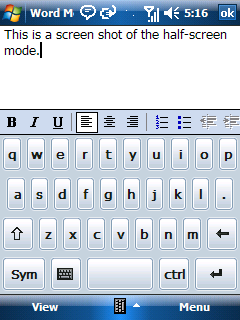
<p><img src="http://www.pencomputing.com/images/spc_1.png" align="right" hspace="6">It is a straightforward QWERTY style so that there is no learning curve. Just pop it up and go to work. It comes in two modes: half-screen and full-screen.</p>
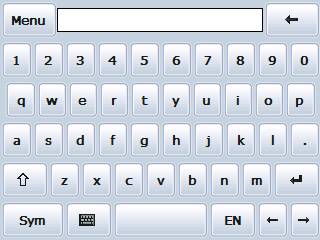
<p>The half-screen mode is designed for both stylus and finger use. I found that I could type just fine even with my largish paws. To increase accuracy and to eliminate typos, hold key, and it will light up and enlarge. If you are on the wrong key, you can slide to the right one, and it will light up too. Release it for the correct input and avoid a mistake.</p>

<p>As you can see, the keys are commodious for fingering with easy access to caps and symbols. Notice that there’s even a Control button. How cool is that?</p>

<p>To change to the full-screen mode, tap on the little keyboard key next to the Sym key. Notice that you get a row of number keys and that it automatically shifts to a horizontal view in this mode. Finger-typers will probably appreciate this view a lot, but I will probably never use it because it only displays one row of text in a continuous scroll. Even if you do a carriage return, it will display a paragraph symbol and continue on the same line, which is interesting.</p>

<p>In the full screen view, it also displays the language you are working in. The keyboard supports 23 different languages, which makes it a real polyglot.</p>

<p><img src="http://www.pencomputing.com/images/spc_2.jpg" align="right" hspace="6">As described above, when you hold a key it illuminates with an enlarged view above the key and allows you to slide to the key you want.</p>
<p>If you go to Settings>Input>Options, you will have the opportunity to switch languages, download and choose skins, select various system settings, and change dictionary settings. I should also mention that this keyboard supports optional gestures. Skins are not available yet, but are promised soon. While this keyboard allows optional gestures, you will have to figure them out for yourself. They are not indicated in the help menu, which is probably an oversight that needs attention.</p>

<p>The SPB keyboard is a great addition to the array of onscreen keyboards, and I highly recommend it for its instant usability and versatility. To tell you the truth, my PDA has a horizontal slideout keyboard, but I prefer to use the SPB online keyboard for most inputting applications. I like the fact that I can use it with one hand, which is impossible to do with the slideout keyboard.</p>

<p>If you visit SPB’s Webpage at www.spbsoftwarehouse.com, you will not find this product offered yet, but keep trying. I have not seen a suggested retail price yet either, but I would guess it will be $29.95, which would make it on the high end of inputters, but it’s certainly a quality product and worth your consideration.</p>]]>

</content>
</entry>
<entry>
<title>XM/Sirius merger sucks seriously</title>
<link rel="alternate" type="text/html" href="http://www.pencomputing.com/mt/archives/2008/11/xmsirius_merger.html" />
<modified>2008-11-03T16:25:03Z</modified>
<issued>2008-11-03T16:24:03Z</issued>
<id>tag:www.pencomputing.com,2008:/mt/8.260</id>
<created>2008-11-03T16:24:03Z</created>
<summary type="text/plain">When I first learned of the impending merger of Sirius and XM satellite radio companies, I feared that my investment in equipment and subscriptions would be adversely affected. Accordingly, I contacted both companies and was assured that the functionality of...</summary>
<author>
<name>conradb212</name>

<email>cb@pencomputing.com</email>
</author>

<content type="text/html" mode="escaped" xml:lang="en" xml:base="http://www.pencomputing.com/mt/">
<![CDATA[<p>When I first learned of the impending merger of Sirius and XM satellite radio companies, I feared that my investment in equipment and subscriptions would be adversely affected. Accordingly, I contacted both companies and was assured that the functionality of my equipment would be protected. I was also assured that the prices would not increase because of a monopoly and that I would experience greater programming benefits from the merger.</p>

<p> I more or less dismissed it as a non-issue and continued to pay for dual subscriptions. My car has Sirius and so does our bedroom. My wife's car has XM and so does my office. That involves four radios and two subscriptions with two reduced rate secondary subscriptions.</p>

<p> This morning I received an email announcing that I could now get the best of Sirius on XM. The best of Sirius was described as Howard Stern, NFL, Martha Steward, NASCAR, and Playboy Radio. Let me assure you that I would never in a million years waste my time listening to any of the "best of Sirius."</p>

<p> Curious, I called XM to see how the merger had actually affected me. What I learned is that while the merger had transpired successfully, XM and Sirius virtually remain two separate companies because of conflicting technology. That means that I must continue to maintain separate subscriptions to support my radios instead of being able to merge my accounts into a single account, which I had been promised would happen. There is no programming advance and no merging of content other than the so-called "best of Sirius," which, as far as I'm concerned is a joke.</p>

<p> Nice going FCC. You really protected the consumer's interest by creating this monopoly. I can't wait for the price gouging to begin. This will probably soon be followed by discontinuing one form of technology creating the obsolescence of one platform over the other without compensation. Keep up the good work FCC.</p>

<p>FCC has created a monopoly with the merger of XM and Sirius. As a result, I must continue to maintain separate Sirius and XM accounts instead of merging them into a single account. There is absolutely no benefit whatsoever for the consumer as a result of this ill-advised merger.</p>

<p>If you also feel that there is cause for concern, I suggest that you visit ConsumerAffairs.com where you can voice your complaint and experience. https://www.consumeraffairs.com/CA/do_datarpt.php</p>]]>

</content>
</entry>
<entry>
<title>Sandisk Sansa Clip MP3 Player   </title>
<link rel="alternate" type="text/html" href="http://www.pencomputing.com/mt/archives/2008/11/sandisk_sansa_c_1.html" />
<modified>2008-11-02T01:52:48Z</modified>
<issued>2008-11-02T01:48:35Z</issued>
<id>tag:www.pencomputing.com,2008:/mt/8.259</id>
<created>2008-11-02T01:48:35Z</created>
<summary type="text/plain">Having just written an article about downloading free eAudiobooks from public libraries, I tried a number of devices for this purpose. The most important attribute is that the player has the ability to bookmark so that you can continue where...</summary>
<author>
<name>conradb212</name>

<email>cb@pencomputing.com</email>
</author>

<content type="text/html" mode="escaped" xml:lang="en" xml:base="http://www.pencomputing.com/mt/">
<![CDATA[<p>Having just written an article about downloading free eAudiobooks from public libraries, I tried a number of devices for this purpose. The most important attribute is that the player has the ability to bookmark so that you can continue where you left off when listening to eAudiobooks. If your player does not have this feature, listening to audiobooks become a cumbersome chore as you have to fast forward manually.</p>

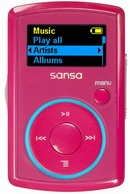
<p><img src="http://www.pencomputing.com/images/news_sandisk_sansa.png" align="left" hspace="8">Unfortunately, Windows Mobile devices equipped with Microsoft’s Media Player do not have the ability to bookmark. However, there are several third party applications that will allow you to bookmark on a WM device.</p>

<p>I tested quite a few MP3 players that would player audiobooks just fine, but without bookmarking capabilities. Make certain that you find an MP3 player that offers this feature. One of my favorites is the Sandisk Sansa Clip MP3 player. The earlier versions of the Clip do not bookmark. But, it is a simple matter of updating the firmware with a download from the Sandisk Website to overcome this problem. You can even download a utility that automatically updates your device everytime you sync it. The latest release of the Clip has bookmarking capability built-in.</p>

<p>The Clip measures approximately 2 1/8 x 1 3/8 x 3/8 inches and weighs a mere ounce. It’s name is derived from the detachable clip on the back that allows you to attach easily to your clothing. We’ve all seen elaborate attachment systems that are ugly and awkward. The Clip is a great solution for this universal problem.</p>

<p>It comes in a variety of colors for the fashion conscious including silver, black, blue, pink, and red. It ranges in memory from 1 GB to 4 GB and ranges in price from $39.95 to $79.39 according to memory. It will accommodate from 500 to 2000 songs. Unfortunately, it does not have an expansion slot so that you are restricted to the onboard memory.</p>

<p>This MP3 player has a number of other welcome features. It plays MP3, WMA, and WMA file formats. It is also an FM radio tuner with 40 presets. It has an internal rechargeable battery that gives up to 15 hours of service. The Clip is also a voice recorder with a built-in microphone so that it makes a nice little memo taker. Sorry, you cannot view photos or watch videos on the diminutive Clip.</p>

<p> It requires Windows XP SP2 or Vista operating systems and connects via a USB mini-port cable, which I appreciate because it means that you have to pack fewer cables when you are on the road. I wish that mini-USB connectors were universal. No goofy proprietary connectors allowed!</p>

<p>In the box, you get the player, a detachable clip, a USB cable, earphones, quick start guide, and an installation CD with user guide.</p>

<p>The Clip is one of the smallest MP3 players available. It’s array of color choices make it attractive choice and a good value for money with its convenient clip attachment system. My only wish would be that it have an expansion slot.</p>

<p>It is available at many electronic retailers online and off. Or, you can buy it directly from Sandisk at www.sandisk.com. </p>]]>

</content>
</entry>
<entry>
<title>NetLibrary</title>
<link rel="alternate" type="text/html" href="http://www.pencomputing.com/mt/archives/2008/10/netlibrary.html" />
<modified>2008-10-18T19:30:11Z</modified>
<issued>2008-10-18T19:18:20Z</issued>
<id>tag:www.pencomputing.com,2008:/mt/8.257</id>
<created>2008-10-18T19:18:20Z</created>
<summary type="text/plain"> My first article in the realm of digital technology was about eBooks. It was full of enthusiasm and optimism. A lot has happened in the fledgling eBook industry over the past few years with major players in and out....</summary>
<author>
<name>conradb212</name>

<email>cb@pencomputing.com</email>
</author>

<content type="text/html" mode="escaped" xml:lang="en" xml:base="http://www.pencomputing.com/mt/">
<![CDATA[<p><img src="http://www.pencomputing.com/images/net_library.png"></p>

<p>My first article in the realm of digital technology was about eBooks. It was full of enthusiasm and optimism.  A lot has happened in the fledgling eBook industry over the past few years with major players in and out. While eBooks did not take off in the revolutionary explosion many predicted, there has been a steady evolution. Just as TV never replaced radio, it is not likely that eBooks will completely replace treeBooks, but eBooks are now and forever firmly entrenched in our digital culture.</p>

<p>Another, related consideration is that the use of computers for doing research and accessing information has caused less interest in libraries and treeBooks as a resource for information. Consequently, libraries have been busy reinventing themselves to remain relevant in a digital world.</p>

<p>A couple of years ago I attended a conference composed mostly of librarians on the subject of the digital native. A digital native is a person who has grown up in the digital age and takes the associated technology for granted. A digital native normally has little use for a library, has no idea what a card catalog is, and would probably rather play a video game than read a treebook for entertainment. The concern of the workshop was how can libraries reach out to the digital native and remain relevant in the community.</p>

<p>One of the ways libraries have retooled their relevancy is by offering digital products. But it’s not enough to offer CDs with music, books, and movies. Once the copy is checked out, it is no longer available. And, just like treeBooks, they can also become lost and damaged</p>

<p>A much better solution is one offered by services such as NetLibrary that libraries can subscribe to that allows patrons to download eBooks and eAudiobooks. This means that if you have a library card and a NetLibrary account, you can download thousands of titles on your computer from any remote location without even having to go into the library. Suddenly, even the smallest library can offer thousands of electronic titles to its patrons. However, the NetLibrary system is flawed in only allowing one person to view a book at a time, which misses the whole point of electronic technology.</p>

<p>Check out time is 21 days after which the license expires and you can no longer access it. You don’t have to worry about returning it or paying past due fines. If you want to renew it, you simply get a new license for another 21 days. Pretty slick, eh?</p>

<p>If your library uses WorldCat for its electronic catalog, both eBooks and eAudiobooks are integrated and clearly indicated as electronic media available for download directly from the catalog listing.</p>

<p>I like to take road trips, and one of my greatest delights is listening to a good audiobook to make the time pass pleasantly. I used to stock up on books on tape, then CD’s. But when I finished them, I usually had to package them up and return them to my library, which was a costly bother. Now, when I am finished listening to an audiobook, I merely delete it and download another one no matter where I am at the time.</p>

<p>To take advantage of this program, you should check to see if your library subscribes to NetLibrary. With a NetLibrary account, you can use your library Website as a portal into the NetLibrary site. Then it is simply a matter of navigating to the download page and choosing whether you want to acquire eBooks or eAudiobooks. You can search for specific titles, authors, subject, or genres. The categories available include</p>

<p>Arts & Entertainment<br />
Biography & Memoir<br />
Business<br />
Children's Classics<br />
Children's Fiction<br />
Children's Nonfiction<br />
Christian Fiction<br />
Classics<br />
Fiction & Literature<br />
Government & Politics<br />
Health & Medicine<br />
Historical Fiction<br />
History<br />
Horror<br />
Humor<br />
Language Studies<br />
Lectures<br />
Mystery & Suspense<br />
Nonfiction<br />
Philosophy<br />
Popular Fiction<br />
Popular Nonfiction<br />
Reference Works<br />
Religion & Spirituality<br />
Romance<br />
Science & Nature<br />
Science Fiction & Fantasy<br />
Self Help<br />
Sports & Recreation<br />
Study Aids<br />
Westerns<br />
Young Adult Classics<br />
Young Adult Fiction<br />
Young Adult Nonfiction</p>

<p>The number of titles available depends on the package that your library subscribes to, but I believe the starter package includes about 2700 eAudiobooks and 170,000 eBooks. </p>

<p>I don’t know if you’ve priced an eBook lately, but they remain relatively expensive, at least as much as a paperback and can be as much as half the price of a hardback. I was always disappointed at the greed of the publishing industry for making popular title eBooks so expensive.</p>

<p>The eAudiobooks are almost always unabridged--no Reader’s Digest condensed versions allowed. Have you priced an unabridged eAudiobook lately? They can run $80 each or more.</p>

<p>When you consider the fact that these materials are a free service from you public library and the convenience of the service—virtually available from anywhere you have an Internet connection--I think you should give your librarian a big hug next time you are there physically.</p>

<h4>eBooks</h4>

<p>NetLibrary, unfortunately, has not helped to further the cause of eBooks in my opinion. Your library must have acquired an Adobe Content Server Gateway License in order to download eBooks in PDF format. Many libraries do not have this option available, in which case you may only read the works online in your computer. You could laboriously copy each page and transfer it to a handheld device, but that is hardly worth the effort.</p>

<p>Alternatively, you can go to <a href="http://www.etext.lib.virginia.edu/">www.etext.lib.virginia.edu</a>  to download free eBooks in Palm and Microsoft Reader format. You visit Project Gutenberg at <a href="http://www.gutenberg.org/">www.gutenberg.org</a> for free eBooks in text, .html, and Plucker formats. Of course you can read Palm, text, and .html files if MobiReader, which I highly recommend. There is even a limited number of eAudiobooks available from Gutenberg.</p>

<p>Of course, if you want to pay for your eBooks and get more current releases, there are many sites available. My favorite is <a href="http://www.mobireader.com/">www.mobireader.com</a> and <a href="http://www.ebooks.com/">www.ebooks.com</a>.  </p>

<p>NetLibrary’s choice of PDF format for eBooks is a poor one, for reading an eBook in this format is the worst possible experience. It would have been much better to select a reader such as MobiPocket that allows bookmarking, annotating, drawing, highlighting, searching, altering type size/style, color, and backgrounds plus popup dictionary definitions by merely tapping a word. This is what makes reading an eBook so worthwhile on a handheld device compared to a treeBook. PDF formatted eBooks are little better than a treeBook without most of the aforementioned features.</p>

<p>If there’s a book that you really would enjoy reading, it might be worth downloading it, converting it to text and then putting it into a MobiPocket reader so that you will have all the enhancements to make it an enjoying reading experience.</p>

<p>If your library doesn’t have the deluxe eBook package you are likely to find a collection of musty, old copyright expired works that haven’t been on a best seller list for at least a hundred years.</p>

<p>But, if your library can afford it, you will find many best sellers and popular titles and authors offered.</p>

<h4>eAudiobooks</h4>

<p>The eAudiobooks may be listened to on any device that is compatible with the WMA format. That means that you cannot listen to them on iPhone,  iPod, or Zune devices because of DRM issues. But you can listen to them on any Windows Mobile device and most MP3 players.</p>

<p>You can choose whether you want CD or radio quality sound. You must choose CD quality for use on handheld devices. Hit the download button, and when the file has finished you can listen to it on your computer. If you wish to transfer it to your Windows Mobile device or to an MP3 player, follow the transfer instructions for your specific machine. You must also acquire a license for the remote device, which is a bothersome extra step. Why not download it in a single operation? You can use Windows Media Player for file transfer if you wish by invoking the sync function.</p>

<p>You can listen to eAudiobooks on your Windows Mobile device using Windows Media Player. However, you cannot bookmark where you left off in Media Player, which is a nuisance. There are, however, several audio players available that do allow bookmarking. Some of my favorites include Pocket Tunes Deluxe by NormSoft, Pocket Player by Conduits Technologies, and AudioPlayer by Vito Technologies. These players will allow you to add bookmarks for listening convenience.</p>

<h4>Other devices</h4>

<p>NetLibrary lists several tested devices that work with the system:</p>

<p>Archos Gmini 4021 Camcorder, Archos 104, Creative Zen 2/4/8/16/32 GN, Creative Zen V, Creastive Zen V Plus, Creative Zen Vision W, Creastive Zen Vision M 60 GB, Samsung YP-T7JZ, Samsung YP –Z5, Samsung YP-S5, Samsung YP-K#A, Toshiba Gigabeat S30. </p>

<p>I have personally tested two Sandisk Sansa devices, the Clip and the Fuze MP3 players. Both of these slim and diminutive players perform perfectly and allow bookmarking, which makes them ideal for audiobook listening and I recommend them highly.</p>

<h4>Conclusion</h4>

<p>While I appreciate NetLibrary making its services available to public libraries so that patrons can enjoy free and remote access to a wide array of eBook and eAudiobooks, its choice of formats is not the best, for it precludes some of the most popular devices such as iPods and the best eBook reader programs such as MobiPocket and eReader. Using .pdf format for eBook downloads is most unfortunate. Using only WMA format for eAudiobooks is equally unfortunate.</p>

<p>Consequently, NetLibrary has ultimately done a disservice to the evolution and acceptance of eBooks. It has perpetuated the myth that eBooks can only be read on computer terminals. By selecting .pdf format, readers are offered the least desirable reading experience with few of the features available that make reading eBooks so desirable in the first place. NetLibrary has made it difficult and expensive for libraries to offer eBook downloads.</p>

<p>These are the kind of bumps in the evolutionary pathway to the acceptance of digital media that just slows down the progress and will take longer for the public to embrace it. NetLibrary should go back to the drawing board and reinvent itself for it is poised to make a great contribution because of its distribution network, but it needs to update its formats and streamline its processes.</p>

<p>I do applaud the efforts of so many local libraries in their efforts to become more relevant in a digital world. It’s just too bad that they are limited in their choices. NetLibrary needs some competition. The digital literati would benefit and rejoice with many new converts along the way.</p>]]>

</content>
</entry>
<entry>
<title>Zinc II -- A deluxe smartphone worthy of your consideration</title>
<link rel="alternate" type="text/html" href="http://www.pencomputing.com/mt/archives/2008/10/zinc_ii_--_a_de.html" />
<modified>2008-10-12T16:00:25Z</modified>
<issued>2008-10-12T15:53:28Z</issued>
<id>tag:www.pencomputing.com,2008:/mt/8.255</id>
<created>2008-10-12T15:53:28Z</created>
<summary type="text/plain">Zinc II is the latest MWg device to be released in the U.S. market following the Atom Life earlier this year. With is flush face touch screen, black rubberized finish, and an economy of buttons on the front, it is...</summary>
<author>
<name>conradb212</name>

<email>cb@pencomputing.com</email>
</author>

<content type="text/html" mode="escaped" xml:lang="en" xml:base="http://www.pencomputing.com/mt/">
<![CDATA[<p>Zinc II is the latest MWg device to be released in the U.S. market following the Atom Life earlier this year. With is flush face touch screen, black rubberized finish, and an economy of buttons on the front, it is a pleasure to hold and to behold.<br />
 <br />
<img src="http://www.ruggedpcreview.com/images/zinc2.png" align="left">Its major features include a horizontal slide-out keyboard, build-in GPS, a 2.0 Mpx camera, Wi-Fi (802.11b/g), Bluetooth 2.0 with unlocked UMTS Tri-band, and GSM Quad-band phone functionality. It measures 109.5 x 59 x 18 mm weighs 159g, and has a 250 x 320 resolution 2.8 inch QVGA touch screen. Sporting a 500 Mhz Samsung processor, it only has 64 MB RAM and 256 MB ROM with a Micro SD memory slot. The battery size is respectable at 1530 mAh<br />
 <br />
Loaded with software, it allows productivity right out of the box. Pre-installed software includes Microsoft Outlook, Windows Live, Internet Explorer, Media Player 10, ActiveSync, Word, Excel, PowerPoint, OneNote, GPS Viewer, MMS client, Wireless Manager, Photo Editor, Streaming Player, Voice Recorder, MWg Quick Menu, and AutoConfig.<br />
 <br />
The box it comes in should win a design award for its quality that hints of the product it contains. Besides the Zinc II, you will discover a battery, AC adapter, stereo headset, mini USB cable, stylus, getting started CD, and printed manual, but, unfortunately, no cradle and no case. Have cradles suddenly gone out of style?<br />
 <br />
On the front of the device there is a five way navigation button ring flanked only by start and stop phone buttons. On the left side is a lanyard opening, two volume control buttons and a button for launching the MWG Quick Menu application. Hold it in, and it invokes the recorder function. This button is programmable.<br />
 <br />
On the right side is the power button, a reset hole, and the camera button. At the bottom right, the telescoping stylus silo resides. A mini USB port is located on the bottom along with a mic hole.<br />
 <br />
There is a removable battery cover on the back, a camera lens with self-portrait mirror and speaker grill.<br />
 <br />
Feature commentary<br />
 <br />
While the 500 Mhz engine is not the brawniest processor out there, it is certainly respectable. However, I was surprised at the paucity of RAM and would have expected twice as much on such a deluxe device. I must say that it showed too when I loaded up with a ton of applications for the 2008 software judging.<br />
 <br />
How I appreciate the built-in GPS. It works great with Google Maps and Windows Live Search. I was amused at the MWg supplied GPS viewer with its non-U.S. standard units and no way to change them. It also vetted well with CoPilot Live.<br />
 <br />
Another great feature is the Quick Menu invoked by a button on the left side that instantly displays  a matrix with Window Media, Pictures & Videos, Camera, and Games. I’m not certain why MWg selected these four menus, and it is strange that you cannot change them to your own preferences. However, if you swipe the finger-friendly screen from left to right, it will pull up another set of applications including Messaging, Internet Explorer, Connectivity, Calendar, File Manager, Notes, Calendar, and Settings. Again, you are stuck with these and cannot change them. Swipe from right to left again, and you are rewarded with a blank matrix of 15 cells that your are free to fill with your favorite applications. It would be nice if it were possible to configure folders here containing a set of favorites, but alas, no can do.<br />
 <br />
If you swipe from left to right, you are presented with a blank matrix of 15 cells for filling with your favorite contacts. At the top are three icons for family, friends, and business contacts. Tap any one to bring up another blank screen with 15 empty cells to fill as you please.<br />
 <br />
Even though it is not as customizable as one may wish, Quick Menu is a nice feature that somewhat rivals applications such as Mobile Shell. In any case it is a graphically-pleasing, finger-friendly approach to accessing your favorites conveniently.<br />
 <br />
To my dismay, I discovered that the earphones, while convenient for talking on the phone hands free and listening to recordings, plug into the mini USB port. This is a major concern because you cannot charge the device and listen at the same time or navigate with GPS or connect to external speakers. What possesses manufacturers to present consumers with such a lame configuration? Please give us a standard 3.5 mm jack in the next iteration.<br />
 <br />
The keyboard slides out smoothly, and the screen instantly switches from  portrait to landscape orientation. The keyboard smoothly snaps into position securely and doesn’t wobble around, which I appreciate. The QWERTY layout keyboard is flat and quite attractive in its presentation with backlit squares around each key when you depress them. There are two softkeys at the top, a Fn key as well as Start, OK, backspace, Shift/Caps, and Enter buttons. Two lights indicate caps and Fn operations.<br />
 <br />
As attractive as it may be, I found the keyboard difficult because of the lack of key definition and tactile feedback. Having to use the function key for so many characters and punctuation marks is annoying and the combination of keys to produce characters slows down inputting. I suppose that like learning to play any new instrument it takes practice. But, when I pick up a guitar, I expect the strings to be in the normal place to produce chords.<br />
 <br />
You will pay more for this keyboard feature, so be certain that you like it before you buy it. Personally, I think it could be improved with more key definition and a more user friendly layout.<br />
 <br />
I was also surprised at the camera being downgraded from 3.0 Mpx to 2.0 Mpx and there not being a flash compared to the WMg Atom Life release earlier this year. To me, this is a step backward for which I see no reason.<br />
 <br />
Support<br />
 <br />
MWg seems to be struggling to institute support for the U.S. market, but it is still in its infancy and needs improvement. There is no phone number to call for technical support, and I had a difficult time getting an email response. The MWg Auto Configuration application does not even have a setup for the U.S., but I understand that one will soon be available. The GPS utility lacks proper U.S. units. I am under the impression that MWg has not quite got all its ducks in line for entering the U.S. market, but these are all easily remedied, and management is keenly aware of solving the problems as soon as possible.<br />
 <br />
Conclusion<br />
 <br />
The Zinc II is indeed a deluxe instrument worthy of your consideration, for it has a robust set of desirable features that integrate to make this a powerful and productive machine. In today’s market, the price of $599 seems reasonable considering its attributes.<br />
 <br />
On the needs for improvement side, I think it could use more RAM, a better keyboard, and a more powerful camera with flash. I’m still shaking my head in disbelief at the choice of audio output jacks. Oh well, it’s a good thing it has Bluetooth.<br />
 <br />
Please visit the WMg Website at www.mwg.com to see the complete line of products. You can purchase the Zinc II from www.expansys.com.</p>]]>

</content>
</entry>
<entry>
<title>The Palm Treo 800w</title>
<link rel="alternate" type="text/html" href="http://www.pencomputing.com/mt/archives/2008/07/the_palm_treo_8.html" />
<modified>2008-07-28T19:20:05Z</modified>
<issued>2008-07-28T19:02:50Z</issued>
<id>tag:www.pencomputing.com,2008:/mt/8.233</id>
<created>2008-07-28T19:02:50Z</created>
<summary type="text/plain">It has been quite some time since Palm has come to the table with a new Windows Mobile Professional device: enter the Treo 800W, WM 6.1. At first glance it doesn’t appear all that different than its predecessor, the Treo...</summary>
<author>
<name>conradb212</name>

<email>cb@pencomputing.com</email>
</author>

<content type="text/html" mode="escaped" xml:lang="en" xml:base="http://www.pencomputing.com/mt/">
<![CDATA[<p>It has been quite some time since Palm has come to the table with a new Windows Mobile Professional device: enter the Treo 800W, WM 6.1. At first glance it doesn’t appear all that different than its predecessor, the Treo 750W. But there are some subtle and not so subtle differences.</p>

<p><img src="http://www.pencomputing.com/images/800wfront.png" align="left">The new Treo is much thinner, the screen is the same size, there is a Sprint logo on the top, there are two new hardware buttons—one for mail, one for calendar, the keyboard keys have a new look and feel-they are flat instead of rounded and therefore seem to have less definition.</p>

<p>A quick glance at the bottom made me quiver with delight for I thought that at last Palm has gotten rid of its goofy, proprietary connector and opted for the more universal mini USB connector. But my hopes were quickly dashed upon closer inspection because it was what they call a micro-USB connector, which is far from standard. This means that you can’t use the old Treo cradles, and you have to pack yet another cable and charger when traveling—not a good thing.</p>

<p>Where was the audio output jack? I hoped maybe they would offer a standard 3.5 jack instead of the 2.5 mm jack found on other Treos, but no such luck. Instead, you must use the micro-USB port for audio output. How ill-conceived is that? You cannot charge your unit while listening to audio output. You cannot connect to standard external speakers. You can’t even talk on the phone while charging and using the headset earbuds that come in the box.</p>

<p>To make matters even worse, the micro USB cable supplied in the box is only good for syncing, not charging. So, you are actually draining battery power while syncing.</p>

<p>And the sacrilege compounds when you realize that you cannot charge the device while using it for navigation in the car using the sync cable. I could not even recharge the 800w with my auxiliary battery charger, which was another disappointment.</p>

<p>The micro-USB port is a disaster that could discourage power users from taking a second look at this device. This unfortunate configuration needs to be changed if the Treo 800W is to be taken seriously as an enterprise device.</p>

<p>If you are a faithful Treo packer looking for a smooth transitional upgrade, fergetaboutit. You will have to abandon all your peripherals and acquire new ones. Even the battery is different, which I suppose is expectable to accommodate the slimmer design. But what am I going to do with all my old spare Treo batteries? Lift up the battery, and you will not find a SIM card slot because there isn’t one, which is another shame.</p>

<p>Amazingly, you will not find a reset button recessed anywhere, not even hidden behind the expansion card slot cover. The only way to reset this machine is to remove the battery—bother. Well, maybe it will prove so stable that you will never have to reset it. Not.</p>

<p>If you were expecting to slip your old mini-SD card from your Treo 750 into the expansion slot of the new 800W, you can forget about that too because it uses a micro-SD card instead.</p>

<p>Up top, we have a stylus silo. The stylus is black nylon and extremely flexible. I do not like this flimsy stylus. You could tie some fish line to it and use as a fly rod. I’ve always appreciated Palm’s sound off/on switch, and it’s still there on the 800W along with the addition of a handy Wi-Fi on/off switch, both on the top panel.</p>

<p>Yes, I said Wi-Fi. This is the first Palm to offer Wi-Fi, a long time in coming and a woefully neglected feature in previous models. Hooray for Palm!</p>

<p>Now you can use your Treo as a laptop Modem connecting to the Internet via a phone network or a Wi-Fi connection. There’s even a software application that comes with it for this purpose. Stellar move, Palm. Of course, you cannot charge the unit via USB cable during this process, which is not good.</p>

<p>On the back, you will find a speaker, a 2.0 Mpx camera lens, and a self-portrait mirror. There is also what the manual describes as an external port that I assume is for an external GPS antenna.</p>

<p>Here’s another great feature of this phone; it comes with built-in GPS—sort of. Sprint wants you to subscribe to their navigation system for $9.95 a month. As you will begin to figure out, this is not the only opportunity to spend more money with Sprint on this phone.</p>

<p>The GPS system uses Sprint cell towers for triangulation as well as satellite communication. It will work with Google Maps for navigation, and you can install your own navigation program if you don’t want to pay Sprint’s monthly fee. You can use the handy GPS panel on the Today screen to find points of interest and directions--a nice feature.</p>

<p>On the left side are two volume control buttons and a button that turns on the voice recorder by default, but you can program it to anything you want. Just hold the button in to start recording, which is a handy feature. Note that in the Settings area, you can assign dual functions to hardware buttons.</p>

<p>On the right side, under a cover, you will find the micro-SD card. This is also where the InfraRed port is located. I wish more people took advantage of IR, for it is very useful for beaming data from device to device. I find that most people don’t even know about it or how to use it—too bad. Check it out. Unfortunately, I notice that some new devices don’t even have IR anymore. What a shame.</p>

<p><b>In the box</b></p>

<p>What comes in the box is bare bones. You get a printed manual, a CD with some applications (some free, some for a fee), a sync cable, an AC charger, and a set of earbuds. There is no extra stylus, no case, no cradle, no car charger, no GPS car mount, no extra battery, and no storage card. In fact, most of these items are not even available yet in the Palm store. So, this unit is a bit ahead of its time.</p>

<p>The 800W comes well-endowed with a rich complement of software:</p>

<p><img src="http://www.pencomputing.com/images/800wback.png" align="right">Active Sync<br />
Calculator<br />
Camera<br />
File Explorer<br />
Games<br />
Aces Texas Hold ‘em Limit<br />
Astraware Sodoku<br />
Bubble Breaker<br />
Solitare<br />
Get Pocket Express<br />
Instant Messaging<br />
Internet Explorer<br />
Internet Sharing<br />
LiveSearch<br />
Maps<br />
Messaging<br />
My Treo<br />
Notes<br />
Office Mobile<br />
Excel Mobile<br />
OneNote Mobile<br />
PowerPoint Mobile<br />
Word Mobile<br />
PDF Viewer<br />
Pictures & Videos<br />
Quick Tour<br />
Search<br />
Software Store<br />
Sounds<br />
Sprint Navigation<br />
Sprint TV<br />
Sprite Backup<br />
Task Manager<br />
Tasks<br />
Voice Command<br />
Windows Live<br />
Windows Media</p>

<p>Notice in the lineup that Sprint offers users several opportunities to spend money with their software store right in the program lineup, navigation, and TV. The store is where you go to spend money on applications, games, ringtones, screen savers, and subscribe to Pocket Express extras. But, at this store you cannot try before you buy!</p>

<p>I was only able to get a couple of free channels to work and never got beyond “loading” for most of the channels I tried. While I think this is a nice feature, it could get expensive. I prefer to use my faithful Slingplayer and watch a full lineup of channels on my home satellite TV and DRV recordings, thank you.</p>

<p>Whoops, I just installed SlingPlayer, and while it works, it only displays a picture of about 1.25 x .75 inches, not at all satisfactory. SlingMedia does not yet support the 320 x 320 screen--I hope they will soon.</p>

<p>I appreciate having the task manager up front and not having to do a tap dance to get to it. I was surprised to see a couple of new games in the stable. The addition of OneNote Mobile was another pleasant surprise for productivity. Instant messaging runs a program that installs AIM.</p>

<p>Windows Live Messenger, and YahooMessenger, but not Google Talk. Voice Command is always a welcome application.</p>

<p>Yes, I know that it has a square screen, and it may seem senseless to some people, Palm people in particular, to allow the screen to rotate as it does in normal WM devices. Screen rotation is not an option with the Treo. But, I consider this a negative factor. Sometimes it’s nice to be able to rotate the screen for reading eBooks, playing games, and for watching movies.</p>

<p>On the CD that comes in the box, you will have the opportunity to download three more applications: Astraware’s Bejeweled 2, Mobimate’s WorldMate, and Sprite Backup. WorldMate is yet another chance to spend money because it will cost you $75 to activate the professional version.</p>

<p><b>Specifications</b><br />
<ul><br />
<li>Platform: WM 6.1 Professional<br />
<li>Display: 320 x 320 transflective color TFT touchscreen<br />
<li>Radio: Qualcomm MSM6800A chipset supporting EvDO Rev A<br />
<li>Wi-Fi: 802.11 b/g<br />
<li>GPS: Built-in GPS (standalone and assisted); Sprint Navigation; GPS powered local search, maps, and navigation from Today screen<br />
<li>Bluetooth: version 2.0<br />
<li>Memory: 256 MB (approx 1270 MB available user memory); 128 MB program memory<br />
<li>Camera: 2.0 Mpx (1280 x 1024); 2x digital zoom and video capture<br />
<li>Battery: Removable 1150 mAh lithium-ion; up to 4.5 hours talk time-200 hours standby<br />
<li>Expansion: Micro-SD card—up to 8 GB supported<br />
<li>Connector: Micro USB 2.0<br />
<li>Dimensions: 2.28” W x 4.41: L x 0.73” D; 5.0 oz.<br />
<li>System requirements: Windows XP; Windows Vista<br />
</ul></p>

<p><b>Customer Support</b></p>

<p>In the past, I’ve always considered Palm customer support exemplary. However, I was disappointed to be connected and disconnected and reconnected with a call center in the Philippines where customer support has been outsourced. There were not only language problems but the technicians were not well trained. I can’t tell you how glad I was when I was connected to Sprint’s customer support center in Dallas, Texas, and to get a good old boy down home Texas accent that I could at least understand.</p>

<p>Sprint offers a variety of opportunities to pay additional fees with this phone. The best strategy is to get an all-inclusive, so-called unlimited usage plan that will cost about $99 a month. However, I have read recently that Sprint is starting to limit the unlimited plans. Pretty soon, using your phone may be like driving your car—unaffordable.</p>

<p>Conclusions</p>

<p>My first PDA was a Palm Pilot, but I couldn’t help switching over to Windows Mobile, and when Palm did the same I was delighted. I’ve had every one of the WM Treos now, and I’m a devoted fan. I like the look and the feel, and it just gets better. I like the innovative touches Palm puts on top of the WM system for greater functionality and ease of use. I particularly appreciate the full QWERTY keyboard and how you can run the whole operation with one hand while driving—just kidding. I am especially grateful for WI-Fi, GPS, and TV, all new features on the Treo 800w. The single, biggest problem is the goofy, non-standard connector that severally limits the unit’s functionality. It’s a keeper, but with some issues that I hope will be resolved the next time around.</p>

<p><b>Pros</b>:<br />
<ul><br />
<li>One Touch Wi-Fi<br />
<li>GPS<br />
<li>TV<br />
<li>Palm telephony enhancements<br />
<li>One-handed operation<br />
<li>Full QWERTY front-facing keyboard<br />
<li>Wi-Fi power button<br />
<li>Sound button<br />
<li>320 x 320 screen resolution<br />
</ul><br />
<b>Con</b>:<br />
<ul><br />
<li>Unconventional connector<br />
<li> Limited battery life<br />
<li>No SIM card<br />
<li>No cradle for viewing, syncing, charging<br />
<li>Cannot charge with sync cable<br />
<li>Cannot charge while navigating in car w/sync cable rendering GPS of limited value<br />
<li>Cannot charge while playing music<br />
<li>Keys have a squishy, less defined feel, and typing is therefore less precise<br />
<li>No 3.5 mm audio jack—cannot use with external speakers<br />
<li>No reset button<br />
<li>Cannot rotate screen<br />
</ul></p>]]>

</content>
</entry>

</feed>