 Current Cover
|
 |
  |
FUGA eDiaryWith VuOne Software 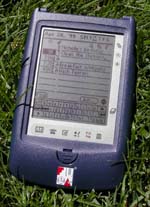
Build a better mousetrap and you're going to catch more mice, more often. In
the PDA industry, there are many minds working on building a better
information trap, to help people store and carry more information. The goal
is to make entering data intuitive enough that users will actually enjoy
using their PDAs, catching more data, more often.
The FUGA Corporation is aiming to do just that: make data more easily
entered and retrieved. They've taken their VuOne software concept and
wrapped a box around it much like Palm Computing did when they took their
Graffiti software method for entering data into the Newton and other
platforms and built the extremely successful Pilot. FUGA calls their device
the eDiary. It's roughly the shape of a Newton Message Pad, complete with
the flip lid from the MP110, shrunk down to the size of a PalmPilot.
The unit fits in the hand nicely and the lid flips over, holding the unit at
a slight angle for easier desktop usability; this is only somewhat helpful,
but of greater assistance is the brief icon guide on the inside of the lid.
I referred to this a few times as I got used to the VuOne way of doing
things. The screen's data area measures 2.5" x 2". Along the bottom of the
screen run the selection icons and up the right of the screen are the
brightness controls and the on/off switch. The battery door hides two AAA
batteries and the reset button; there is also a memory battery door which
comes off with a few turns of the philips screw.
Finally, there's a door on the bottom left for accessing the small card edge
for connecting to the data synchronization cable. So that sums up the
hardware, but what FUGA wants you to know is that this is all about the
software interface and your data.
The VuOne software is very tightly integrated, and the company's hope is to
attract users of paper organizers that the Palm didn't already get. They
believe that the Palm attracted people who "get" computers: people who
already use computers in their daily life and understand the concept of drop
down menus and different programs for different purposes. VuOne tries to get
users interested in entering and retrieving their data in one view, hence
the name.
There are actually three views, the first one being the VuOne DateBook. This
is where you do most of your data entry and is the main view for seeing your
appointments, expenses and To Do items. The second view is the AddressVu,
where you'll find a tabbed index for accessing your address book entries in
alphabetical order. Then there's the ListVu, which is actually like the To
Do function, but its items do not appear in the main DateBook; this is handy
for entering and managing large project lists without cluttering your main
DateBook view, and items can be organized into separate files.
Learning curve
FUGA has noted that Palm users seem to have a hard time grasping the
concepts of VuOne, but users of paper diaries get it pretty quickly. I was
struggling with the interface myself, so I took it to a neighboring office
to a woman I know who has a paper organizer. With a brief introduction, in
less than two minutes, she had entered an expense item, an appointment
spanning two hours, and a To Do item. "Pretty simple to me," she said. I
guess they weren't kidding.
Humbled, I headed back to my desk to grab the manual. It really does do a
lot with a little space. The DateBook uses tags to categorize everything,
helping differentiate between types of data. In general, one starts by
selecting the tag, by default an Appointment, To Do item, Expense or
Birthday reminder. Other tags can be added for your own purposes. Then you
can click on the clock column if it's a time-scheduled item, and a simple
chart of times comes up, horizontally arranged, which allows you to select a
range of time with ease. To start at 7:00 am, one has to select a little to
the right of 7, as clicking directly on 7 selects 6:45, and one must carry
through to the center of the next number to select that exact time. A little
practice makes this easy. You can also easily set up repeating items for all
types of tags, expenses included. Where in the Palm you'd have to enter each
hotel expense for a number of days, with the VuOne interface, you just
create the expense item and then click on the repeat icon (two overlapping
pages). Then you simply select how often you want it to repeat ("daily,
weekly, monthly, 6 monthly, yearly"), then tell it how many times to repeat.
When it comes time to tally your expenses, you can do so for a range of
dates, categories and even types of expenses, whether it was charged to your
visa or paid in cash. All this is accessible from the same screen, by
pressing on the Advanced Find button.
In all the main views, you'll find a small Qwerty keyboard. This is
important, since there's no handwriting recognition on the eDiary.
With every FUGA eDiary comes a version of the program that gets loaded on
the computer. It operates very similarly to the handheld version, so users
needn't learn two separate interfaces. Data can be synchronized with the
desktop, but the unit was not designed with constant synchronization in
mind. The main focus is on the user entering data on the eDiary itself.
The VuOne model is quite an interesting one, offering users a way to see all
their data at once with a few simple taps. Just sliding one's pen over the
days of the week display (SMTWTFS) will show all the appointments, notes,
expenses, and To Do items for a given number of days in one single view.
Such a model could be useful on other platforms as well, making me wonder if
they won't be releasing a software-only version sometime soon. Those tired
of switching between applications to see all their action items for a given
day might give the eDiary a look, and paper planner users might want to try
this new PDA that seems to be custom made for them. www.fuga.com US$149.95
| ||
|
[Homepage] All contents ©1995-1999 Pen Computing Magazine, Inc. All rights reserved. |